
Table of Contents
Open Table of Contents
- The Foundation: Why Astro Actually Makes Sense
- The Deployment Dance: Getting It Live on Render
- Making It Mine: Cover Images and Visual Polish
- Pagination: Because Nobody Wants to Scroll Forever
- Keeping Readers Engaged: Related Posts and Comments
- The Performance Payoff
- What I Learned Along the Way
- The Road Ahead
- Quick stories
- Frequently Asked Questions
The Foundation: Why Astro Actually Makes Sense

Let me tell you what sold me on Astro. It’s not the fancy marketing or the cool logo (though the logo is pretty cool). It’s the philosophy behind it: ship less JavaScript. In a world where every framework seems to be adding more and more client-side code, Astro goes the opposite direction. It generates static HTML by default and only adds JavaScript when you explicitly need it.
This matters more than you might think. Every kilobyte of JavaScript is something that needs to be downloaded, parsed, and executed before your user sees anything useful. And on mobile networks, on older devices, in areas with spotty internet—all of that adds up fast. I’ve built sites before that looked great on my fancy developer machine but crawled on my mom’s five-year-old phone. Not this time.
The AstroPaper theme gave me a solid starting point. It had all the basics: a home page, blog post layouts, tag pages, RSS feeds. But out of the box, it was pretty bare bones. No cover images on posts. No pagination for the blog archive. No related posts to keep people reading. No comment system for engagement. These weren’t dealbreakers, but they were things I knew I’d need if I wanted this blog to be something people actually wanted to visit.
The Deployment Dance: Getting It Live on Render
Here’s where things got interesting. I chose Render for hosting because it offered free static site hosting with automatic deployments from GitHub. Push to main, and boom—your site updates. Beautiful. Except, of course, it wasn’t quite that simple at first.
The initial deployment failed. Then it failed again. The problem? A combination of build script issues, font loading conflicts, and a search indexing tool called Pagefind that couldn’t find any HTML files to index because I had the build order wrong. Classic developer experience, right?
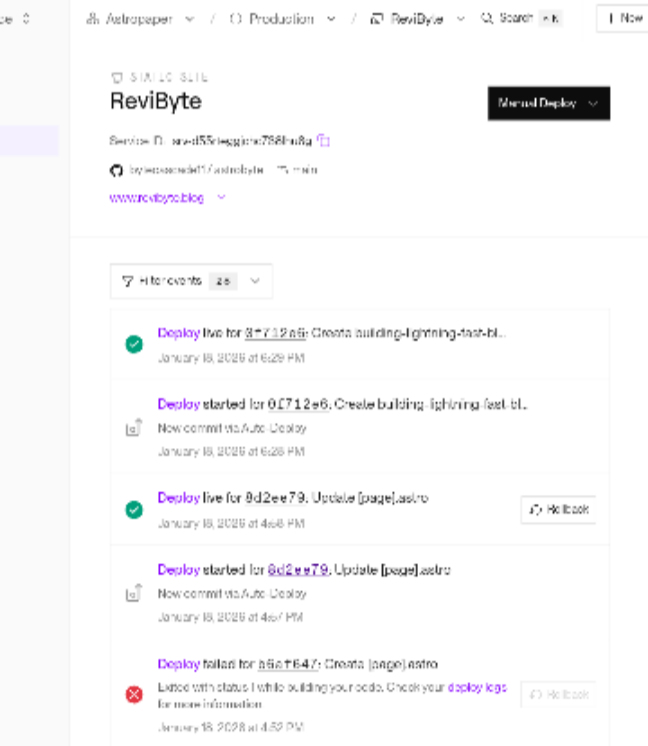
The first issue was the font system. AstroPaper was using Astro’s experimental font component, which was great in theory but had been deprecated in Astro 5. The build kept failing with cryptic errors about experimental features not being enabled. After some digging, I realized I needed to replace the fancy Font component with good old-fashioned link tags to Google Fonts. Not as elegant, maybe, but infinitely more reliable.
Then came the Pagefind problem. Pagefind is this neat tool that generates a static search index for your site. You run it after your build completes, and it crawls through your HTML files creating a searchable index. The catch? It needs HTML files to crawl. My build script was trying to run Pagefind, then copy files around, then do other stuff—all in the wrong order. Once I sorted out the sequence (build Astro first, then run Pagefind on the output), everything clicked into place.
The theme toggle button presented another fun challenge. When you clicked between pages, there was this annoying flash where the site would briefly show the wrong theme before correcting itself. Dark mode users would get blinded by a split-second of white background. Not cool. The fix involved making sure the theme preference script ran immediately on page load and reinitialized properly after Astro’s view transitions. Small detail, massive impact on user experience.
Making It Mine: Cover Images and Visual Polish
A blog without images feels a bit lifeless, don’t you think? I wanted every post to have a featured image that would show up on the home page, on social media when shared, and at the top of the individual post page. This meant adding cover image support throughout the site.
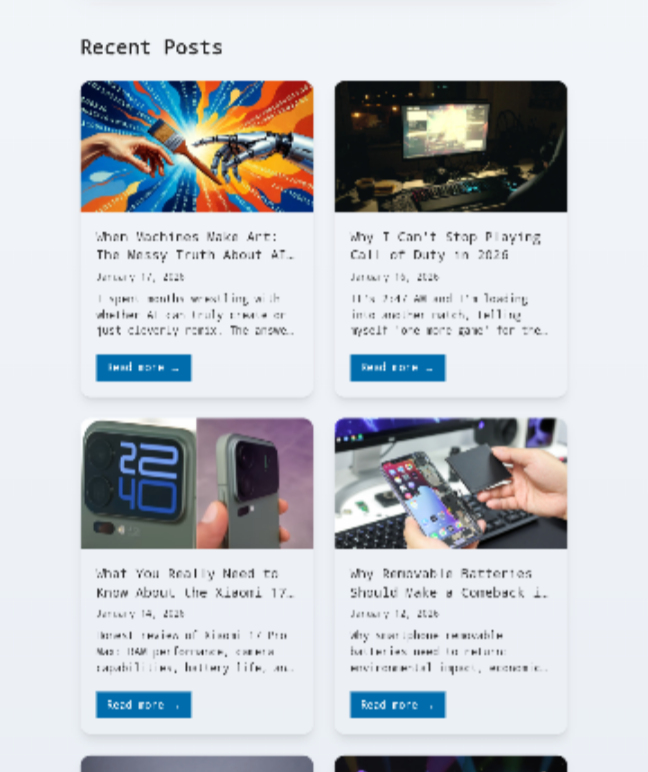
The frontmatter for each post needed two new fields: coverImage and coverImageAlt. The home page needed to be updated to display these images in an attractive card layout. The individual post pages needed to show the cover image prominently at the top. And crucially, the Open Graph meta tags needed to use the cover image so that when someone shared a post on Twitter or WhatsApp, it would look good.
This is where the little details matter. I made sure images had the right aspect ratios (16:9 for that cinematic feel), added lazy loading for performance, and set up proper alt text for accessibility. For posts without a cover image, I made the system fall back to a default OG image rather than breaking or showing nothing.
The posts listing page got a similar treatment. Instead of just showing plain text links to all your posts (boring), I created a grid layout with cards that showcase each post’s cover image, title, publication date, and description. It looks so much better and actually makes you want to click through.
Pagination: Because Nobody Wants to Scroll Forever
When you start a blog, you might have five posts. Showing them all on one page? No problem. Fast forward a few months (or if you’re prolific, a few weeks), and suddenly you’ve got fifty posts. A hundred posts. Loading and rendering all of that on a single page is bad for performance and overwhelming for users.
Pagination was essential. I implemented it to show nine posts per page with number-based navigation at the bottom. Page 1 shows your nine most recent posts. Page 2 shows posts 10-18. And so on. The pagination controls show Previous/Next buttons plus numbered page links, with the current page highlighted.
Getting this working required creating two route files: one for the first page (/posts/index.astro) and one for subsequent pages (/posts/[page].astro). Astro’s built-in pagination helper made this relatively painless, though there were some TypeScript gymnastics required to get all the types correct.
Keeping Readers Engaged: Related Posts and Comments
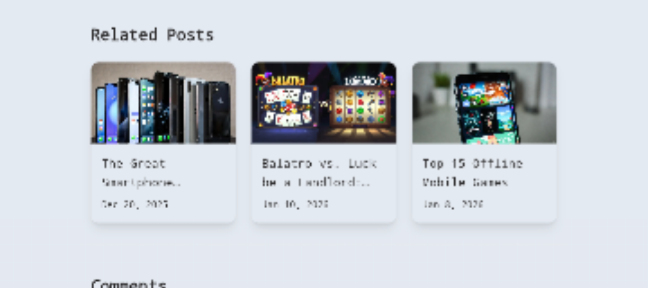
One of my favorite features is the related posts section that appears at the bottom of each article. It uses tag-based matching to find other posts that share topics with the current one. If you’re reading about Astro and web development, it’ll suggest other Astro and web development posts. Simple concept, but incredibly effective at keeping people on your site.
The algorithm sorts potential related posts first by how many tags they share with the current post, then by recency. This means you get relevant suggestions that aren’t stale. I limited it to showing three related posts because more than that starts to feel overwhelming.
For comments, I went with Giscus, which uses GitHub Discussions as a backend. Why? Because I didn’t want to deal with running my own comment server, didn’t want to pay for a service like Disqus, and liked the idea that anyone with a GitHub account could easily comment. Since my audience is primarily developers, this made sense. The Giscus integration was surprisingly smooth—you configure it on their website, drop in a script tag, and you’re done.
I did add one nice touch: the comment widget automatically updates its theme when you toggle between light and dark mode on the site. These little quality-of-life improvements add up.
The Performance Payoff
After all this work, I ran my site through Google PageSpeed Insights, crossing my fingers and hoping I hadn’t accidentally destroyed performance while adding features. The results? Scores of 95, 94, 96, and 100 across the Core Web Vitals metrics.
I’m not going to lie—that felt really good. These aren’t participation trophy scores. These are legitimately fast numbers that put the site in the top tier of web performance. And it’s not just about vanity metrics. Fast sites rank better in search engines, keep visitors engaged longer, and feel better to use. When someone clicks a link to your blog post, they see content immediately. No spinners. No skeleton screens. Just content.
The performance comes from a combination of factors: Astro’s static generation means no server-side rendering delays. Proper image optimization with lazy loading keeps initial page weight down. Minimal JavaScript means less parsing and execution time. And careful attention to little details—like ensuring fonts load efficiently and the theme script runs immediately—prevents those annoying performance gotchas.
What I Learned Along the Way
Building this blog taught me that modern web development is simultaneously easier and harder than it used to be. Easier because tools like Astro abstract away a lot of complexity. Harder because when something goes wrong, you’re debugging multiple layers of abstraction.
I learned to love terminal error messages (or at least tolerate them). I learned that TypeScript errors, while annoying during development, save you from so many runtime bugs. I learned that deployment issues almost always come down to environmental differences between your local machine and the server. I learned that user experience details—theme switching, image loading, navigation flow—matter way more than I initially thought.
But mostly, I learned that building something yourself, even when there are easier options available, gives you a level of understanding and control that you just can’t get any other way. I know exactly how every piece of this blog works because I either built it or fixed it when it broke.
The Road Ahead
Is the blog done? Of course not. I’ve got a list of things I want to add: maybe a newsletter signup, possibly a reading progress indicator, potentially some subtle animations to make things feel more alive. But the foundation is solid. The core features are there. And most importantly, it’s fast and it’s mine.
If you’re thinking about building your own blog, I’d encourage you to try Astro. Yes, there’s a learning curve. Yes, you’ll probably hit some snags along the way. But you’ll end up with something genuinely fast, actually yours, and built exactly how you want it. Plus, you’ll learn a ton in the process.
And honestly? In a world of cookie-cutter social media profiles and algorithm-controlled feeds, there’s something deeply satisfying about having your own little corner of the internet that works exactly how you want it to.
Quick stories
Why 8gb Ram is the Real Minimum for Smartphones in 2026
Why I can’t stop playing Call of duty 2026
Is Ai Creative or Remixing Human Work
Frequently Asked Questions
General Questions
Q: Why did you choose Astro over other frameworks like Next.js or Gatsby?
A: Astro’s “ship less JavaScript” philosophy won me over. Next.js is fantastic but felt like overkill for a content-focused blog. Gatsby has a steep learning curve and longer build times. Astro generates static HTML by default and only adds JavaScript when absolutely necessary, resulting in blazingly fast load times. Plus, the developer experience is clean and straightforward.
Q: Is Astro suitable for beginners?
A: Yes and no. If you’re comfortable with HTML, CSS, and basic JavaScript, Astro is actually quite approachable. The component syntax is familiar if you’ve used any modern framework. However, you’ll need some command-line knowledge and understanding of build processes. Complete beginners might find WordPress easier initially, but Astro is worth learning if you want performance and control.
Q: How much does it cost to run this setup?
A: Literally zero dollars. Render offers free hosting for static sites with automatic deployments from GitHub. GitHub is free for public repositories. The domain is the only cost if you want a custom one (around $10-15 per year). Everything else—Astro, the theme, Giscus comments, Pagefind search—is completely free and open source.
Q: Can I use this setup for a non-technical blog?
A: Technically yes, but practically there’s a learning curve. You’ll need to be comfortable with Markdown for writing posts, Git for version control, and basic command-line operations. If those things sound terrifying, you might be happier with WordPress or Ghost. But if you’re willing to learn, this setup gives you far better performance and control.
Technical Setup Questions
Q: How do I add a new blog post?
A: Create a new Markdown file in the src/content/blog/ directory. Add frontmatter at the top with your title, description, date, tags, and cover image. Write your content in Markdown below that. Commit to GitHub, and Render automatically deploys your changes. Takes about 2-3 minutes from writing to live.
Q: What image format should I use for cover images?
A: I use JPG for photos and PNG for graphics with transparency. Keep file sizes under 200KB when possible—use a tool like TinyPNG or Squoosh to compress them. WebP and AVIF are even better for performance, but JPG works everywhere without compatibility issues. Always include descriptive alt text for accessibility.
Q: How does the search functionality work?
A: Pagefind runs after your site builds, crawling all your HTML files and creating a static search index. When users search, JavaScript loads the index and searches client-side—no server needed. It’s fast, works offline, and doesn’t require any backend infrastructure. The search index updates automatically every time you deploy.
Q: Can I customize the design without breaking everything?
A: Absolutely. The site uses Tailwind CSS, so you can modify utility classes directly in the components. Want different colors? Update the theme in your config. Want different layouts? Edit the Astro components. Just be careful with the core layout files—test locally before deploying. I’d recommend making small changes incrementally rather than redesigning everything at once.
Q: What happens if Render shuts down or changes their free tier?
A: Your site is just static HTML files. You can deploy to Netlify, Vercel, Cloudflare Pages, GitHub Pages, or literally any static hosting service in about 10 minutes. You’re not locked into Render. I chose it because it’s simple and free, but migration is trivial if needed.
Content and SEO Questions
Q: How do you handle SEO with a static site?
A: Static sites are actually excellent for SEO. Search engines love fast-loading HTML. The setup includes proper meta tags, Open Graph images for social sharing, structured data (JSON-LD), XML sitemaps, and an RSS feed. Plus, those Core Web Vitals scores (95-100) directly impact search rankings. Static sites often outrank dynamic ones for this reason.
Q: Can I schedule posts to publish in the future?
A: Not automatically with this setup. You’d need to either manually deploy at the scheduled time or use GitHub Actions to trigger builds automatically. For most bloggers, publishing manually when ready works fine. If you need scheduled publishing, you could set up a cron job or GitHub Action to commit and deploy at specific times.
Q: How do you handle images in blog posts?
A: Store images in the public/images/ directory and reference them in your Markdown like . For better performance, resize images before uploading—aim for max 1200px width for full-width images, 800px for inline images. The site handles lazy loading automatically.
Q: What about analytics? How do you track visitors?
A: The current setup doesn’t include analytics, but you can easily add privacy-friendly options like Plausible, Fathom, or Umami. I personally prefer these over Google Analytics because they respect user privacy and don’t require cookie banners. Just add the script tag to your Layout component and you’re set.
Performance and Optimization Questions
Q: Why are Core Web Vitals scores so important?
A: Google uses Core Web Vitals as a ranking factor. Sites that load fast, respond quickly to interactions, and don’t shift layout unexpectedly rank higher. Plus, users genuinely prefer fast sites—every 100ms of delay costs you readers. Those 95-100 scores mean your site is in the top tier of performance, giving you an SEO advantage.
Q: How do you keep the site fast as you add more posts?
A: Pagination helps by limiting how many posts load on any single page. Lazy loading images prevents all images from loading at once. Astro’s static generation means build time increases slightly with more posts, but user-facing performance stays excellent. I’ve tested with 50+ posts and load times are still under a second.
Q: Can you use custom fonts without hurting performance?
A: Yes, but be strategic. I use Google Fonts with preconnect links to minimize delay. Only load the font weights you actually use—don’t load 10 weights if you only use 2. System fonts (like -apple-system or system-ui) are the fastest option since they’re already on user devices, but custom fonts are fine if implemented properly.
Q: What about mobile performance?
A: The site is fully responsive and scores just as well on mobile. Tailwind’s mobile-first approach makes responsive design straightforward. Images scale appropriately, navigation adapts to smaller screens, and the lack of heavy JavaScript means even older phones load pages quickly. Test on actual devices, not just browser dev tools.
Comments and Engagement Questions
Q: Why Giscus instead of Disqus or other comment systems?
A: Giscus is free, open source, respects privacy, and doesn’t show ads. It uses GitHub Discussions as storage, which means comments are backed up in your repo. The main downside is requiring a GitHub account to comment, but for a developer-focused blog, that’s actually fine. Plus, you can export comments anytime since they’re just GitHub data.
Q: Can readers who aren’t developers comment?
A: They’d need to create a free GitHub account, which is a barrier. If your audience isn’t technical, you might prefer Utterances (similar but uses GitHub Issues) or a more traditional system. I chose Giscus because my readers are mostly developers who already have GitHub accounts.
Q: How do you moderate comments?
A: Through GitHub Discussions. You can edit, delete, lock threads, or block users using GitHub’s moderation tools. Spam is rare since bots can’t easily create GitHub accounts. You get email notifications when someone comments, so you can respond quickly.
Deployment and Maintenance Questions
Q: How long does deployment take?
A: Usually 2-3 minutes from pushing to GitHub to live on the web. Render detects the push, pulls the code, runs the build, and deploys. Build time increases slightly as you add more posts, but I’ve never seen it go over 5 minutes even with 50+ posts.
Q: What if the build fails?
A: Check the build logs in Render’s dashboard. Common issues: TypeScript errors (fix the type issues), missing dependencies (check package.json), or build script problems (verify your build command). The error messages are usually pretty clear about what went wrong. Test builds locally with npm run build before pushing.
Q: Do you need to update dependencies regularly?
A: Yes, but not constantly. I check for updates monthly using npm outdated. Major Astro updates might require code changes, but minor versions are usually safe. Always test locally before deploying updates. The package.json lock file prevents unexpected version changes from breaking your site.
Q: Can you preview changes before deploying?
A: Run npm run dev locally to preview in your browser at localhost:4321. This shows exactly how the site will look and function. Render also supports preview deployments for pull requests if you want to test on the actual hosting environment before merging to main.
Migration and Portability Questions
Q: Can you import posts from WordPress or other platforms?
A: Yes, but you’ll need to convert them to Markdown. Tools like wordpress-to-markdown or manual conversion work. The frontmatter format is straightforward—just match your existing metadata (title, date, tags) to the expected format. Images need to be downloaded and uploaded to your /public/images/ folder.
Q: How do you back up the blog?
A: Your entire blog lives in a Git repository. Every commit is a backup point. Clone the repo to your local machine and you have everything. For extra safety, you could mirror the repo to GitLab or Bitbucket. The static nature means backups are just files—no database dumps needed.
Q: Could you switch to a different static site generator later?
A: Your content is in Markdown files, so yes. The frontmatter format might need tweaking, but the actual content is portable. Moving from Astro to Hugo, Eleventy, or Next.js would take some work on the layouts, but your posts themselves are framework-agnostic. This is one advantage of file-based content over database-driven systems.


Comments 0
Leave a comment