Table of Contents
Open Table of Contents
- Why Astro Is Quietly Replacing WordPress for Content Sites
- The WordPress Problem Nobody Talks About
- What Makes Astro Different
- Content Management Without the CMS
- Performance That Actually Matters
- The Developer Experience Revolution
- The Hosting Economics
- The Migration Reality Check
- Who Should Make the Switch
- The Quiet Revolution
- Frequently Asked Questions
- Is Astro harder to learn than WordPress?
- Can I use Astro with a visual content editor?
- What happens to my existing WordPress content?
- Does Astro work for large sites with thousands of pages?
- Can I still use WordPress plugins with Astro?
- What about comments, search, and other interactive features?
- Is Astro suitable for e-commerce sites?
- How does hosting work without a database?
- Will my site’s SEO suffer if I switch to Astro?
- Can multiple people work on an Astro site simultaneously?
- What if I need a feature that WordPress plugins provide?
- How long does it take to build and deploy changes?
- Is Astro just a trend, or is it here to stay?
- Can I try Astro without fully committing to migration?
- What kind of support is available if I run into problems?
Why Astro Is Quietly Replacing WordPress for Content Sites
There’s a shift happening in how people build content websites, and most people haven’t noticed it yet. WordPress has dominated content management for nearly two decades, powering everything from personal blogs to major publications. But lately, a growing number of developers and content creators are walking away from it entirely—not because WordPress is bad, but because something fundamentally different has emerged.
That something is Astro, and it’s not trying to be another WordPress alternative. It’s rethinking the entire approach. Read Is Ai Creative or remixing Human work
Why I can’t stop playing call of duty-2026
Building lightning fast blog with Astro complete setup
The WordPress Problem Nobody Talks About
WordPress works brilliantly until it doesn’t. You start with a simple blog, add a theme, install a few plugins for SEO and caching, maybe throw in a page builder. Before long, you’re managing updates for twenty different plugins, troubleshooting conflicts, and watching your page load times creep upward despite paying for premium hosting.
The real issue isn’t that WordPress is slow—it’s that WordPress generates every page dynamically, querying databases and running PHP scripts each time someone visits. For a content site where the articles rarely change, this is like hiring a chef to cook the same meal from scratch every single time instead of just reheating what you made this morning.
Static site generators promised to fix this years ago with Jekyll and Hugo, but they came with their own problems. They were fast, sure, but they were also rigid. Want to add a comment system? Good luck. Need dynamic features? Start writing custom JavaScript. The developer experience was sparse, and the learning curve was steep for anyone coming from the visual comfort of WordPress.
What Makes Astro Different
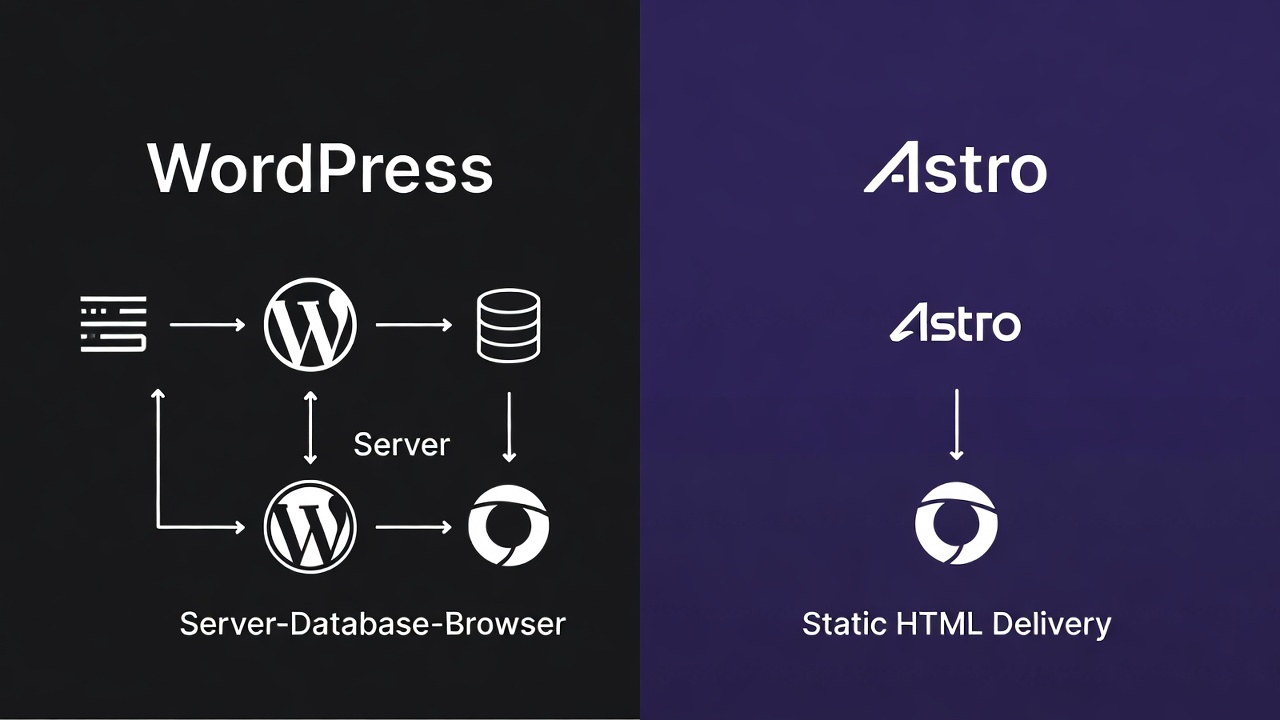
Astro launched in 2021 with a deceptively simple premise: ship zero JavaScript by default. Every component you write is rendered to static HTML at build time. No React hydration, no Vue runtime, no framework overhead—unless you specifically need it.
This sounds limiting until you realize how rarely you actually need JavaScript on a content site. Your blog posts don’t need JavaScript. Your about page doesn’t need JavaScript. Even your archive pages and category listings don’t need JavaScript. What you need is fast-loading HTML with great SEO, and that’s exactly what Astro delivers.
But here’s where it gets interesting: when you do need interactivity—a search bar, a newsletter signup form, an image carousel—Astro lets you add it surgically. You can use React for one component, Vue for another, and Svelte for a third, all in the same project. Each component only loads the JavaScript it needs, and only when it needs it.
This isn’t a theoretical advantage. Real sites are seeing 90%+ reductions in JavaScript bundle sizes compared to their old WordPress setups. Pages that took three seconds to load now render in under half a second.
Content Management Without the CMS
The elephant in the room is content management. WordPress has an admin panel. Astro has… Markdown files in a folder. For many teams, that sounds like a dealbreaker.
Except it isn’t, and here’s why: most WordPress content workflows are broken anyway.
Think about how content actually gets created. Writers draft in Google Docs. Editors review and mark changes. Someone copies the approved text into WordPress, where they spend fifteen minutes fighting with the block editor to make it look right. Images get uploaded separately, then resized, then optimized with another plugin. The whole process is duct-taped together with browser tabs and clipboard managers.
With Astro, content lives in Markdown files in a Git repository. This might sound technical, but the workflow is cleaner: writers draft in any Markdown editor they like, content goes through pull requests for review, and publishing is a git merge that triggers automatic deployment. No admin panel to log into. No “are you sure you want to leave this page?” warnings. No lost drafts because your session expired.
For teams that need a visual editor, headless CMS options like Sanity, Contentful, or even WordPress itself (used headless) integrate seamlessly with Astro. You get the editing experience you want with the performance of static generation.
Performance That Actually Matters

Page speed isn’t just a vanity metric anymore. Google has made Core Web Vitals a ranking factor. Users abandon sites that don’t load within a few seconds. Publishing platforms like Medium and Substack have trained readers to expect instant page loads.
WordPress sites can be optimized, absolutely. You can add caching layers, CDN delivery, image optimization, lazy loading, and all the performance plugins you can find. And after hundreds of dollars in premium tools and hours of configuration, you might hit a Lighthouse score in the 80s.
An out-of-the-box Astro site regularly scores 100/100 on Lighthouse with zero optimization effort. It’s not magic—it’s just that when you’re serving static HTML with minimal JavaScript, there’s not much left to optimize. The performance is baked into the architecture.
This matters more than developers often realize. A faster site means better search rankings, higher conversion rates, and lower bounce rates. For content sites that live or die by organic traffic, that performance delta translates directly to revenue.
The Developer Experience Revolution
If you’ve ever built a WordPress theme, you know the pain of mixing PHP, HTML, CSS, and JavaScript across multiple files while trying to remember which hook goes where. Template hierarchy is powerful but confusing. The loop is elegant but archaic. Modern tooling barely works because WordPress predates most of it.
Astro components are just HTML with superpowers. You write what looks like HTML, sprinkle in some dynamic data with a clean syntax, add your styles scoped to the component, and you’re done. The file structure makes sense. The mental model is clear. Hot module reloading means your changes appear instantly.
TypeScript works natively. Modern CSS features just work. You can use Tailwind, Sass, or plain CSS without wrestling with build tools. Import npm packages without plugins. Use modern JavaScript features without worrying about transpilation.
This isn’t just about developer happiness—though that matters. It’s about velocity. Features that would take days to implement in WordPress happen in hours with Astro. Want to add a reading time estimate to every post? That’s five minutes. Need automatic image optimization? It’s built in. Want to generate an RSS feed? Add one line to your config.
The Hosting Economics
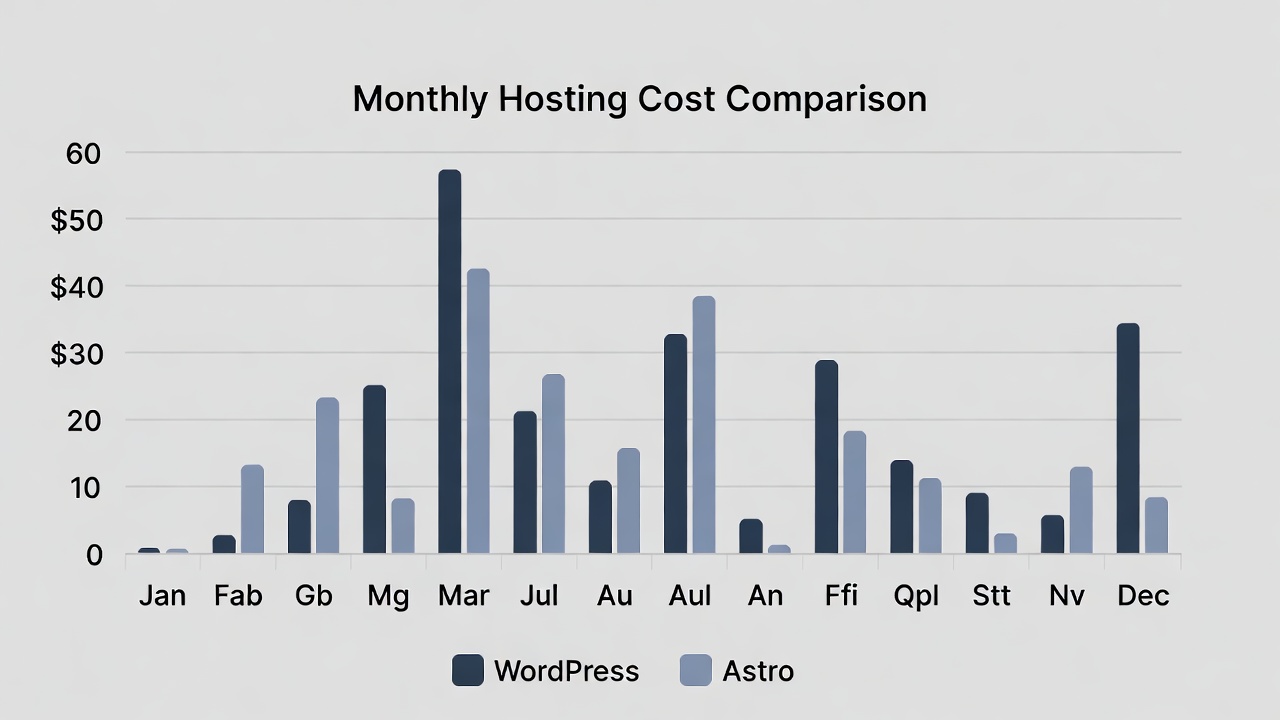
A medium-traffic WordPress site might cost $20-50/month in hosting, or significantly more if you need managed WordPress hosting for decent performance. You’re paying for PHP processing power, database operations, and enough resources to handle traffic spikes.
An Astro site can be hosted for free on platforms like Netlify, Vercel, or Cloudflare Pages, with automatic CDN distribution worldwide. Even high-traffic sites often stay within free tiers because serving static files is incredibly cheap. When you do need to pay, it’s usually a fraction of WordPress hosting costs.
This isn’t just about money—it’s about reliability. Static sites don’t have databases to crash, PHP processes to max out, or cache layers to invalidate incorrectly. They’re remarkably hard to break, and when something does go wrong, the debugging surface is tiny.
The Migration Reality Check
None of this means migrating from WordPress is trivial. If you have years of content, custom post types, complex taxonomies, and established workflows, switching to Astro is a project, not a weekend task.
But the teams making this switch aren’t doing it on a whim. They’re running the numbers and realizing that the investment pays for itself within months through reduced hosting costs, faster development cycles, and better performance outcomes.
The technical migration is often easier than expected. WordPress can export to Markdown. Astro can import from headless CMS platforms. There are tools and scripts for batch processing. The hard part isn’t usually the content—it’s rethinking processes that have calcified around WordPress’s specific way of doing things.
Who Should Make the Switch

Astro isn’t for everyone. If you’re running WooCommerce, you need WordPress (or a dedicated e-commerce platform). If your content team is non-technical and loves the WordPress editor, forcing them into Markdown might create more problems than it solves. If you’ve invested heavily in a WordPress ecosystem that works well, there’s no urgent reason to change.
But if you’re building a new content site, or if your WordPress site has become slow and complex despite your best efforts, or if you’re spending more time managing your CMS than creating content, Astro deserves serious consideration.
It’s particularly compelling for developer-friendly teams, documentation sites, marketing sites, blogs focused on performance, and any content site where SEO and page speed directly impact success.
The Quiet Revolution
The shift to Astro isn’t happening through marketing campaigns or evangelical blog posts. It’s happening one frustrated developer at a time, one team trying to hit performance targets they can’t reach with WordPress, one realization that the complexity isn’t necessary anymore.
Major companies are rebuilding their marketing sites with Astro. Popular blogs are migrating quietly. New publications are launching on it instead of defaulting to WordPress. The momentum is real, even if it hasn’t hit mainstream awareness yet.
WordPress will remain dominant for years—it’s deeply entrenched, continuously improving, and genuinely good at what it does. But its dominance in content sites specifically is no longer inevitable. The alternative isn’t another CMS trying to be a better WordPress. It’s a fundamentally different approach that questions whether we need a traditional CMS at all.
That’s what makes this shift interesting. It’s not about replacing WordPress with something similar. It’s about recognizing that for content sites focused on speed, simplicity, and developer experience, we might have been solving the wrong problem all along.
The future of content sites might not involve databases, admin panels, or plugins. It might just be fast-loading HTML, created with modern tools, deployed globally in seconds. And for a growing number of teams, that future is already here.
Frequently Asked Questions
Is Astro harder to learn than WordPress?
It depends on your background. If you’re comfortable with HTML and basic JavaScript, Astro’s learning curve is actually quite gentle—you’re mostly writing HTML with some extra features. For non-technical users who love WordPress’s visual editor, Astro will feel more technical. However, many developers find Astro easier to work with than WordPress theme development because it uses modern web standards instead of PHP-specific patterns.
Can I use Astro with a visual content editor?
Absolutely. While Astro works great with Markdown files, it integrates seamlessly with headless CMS platforms like Sanity, Contentful, Strapi, or even WordPress itself (used as a headless CMS). Your content team can use a familiar visual editor while your site benefits from Astro’s performance. You get the best of both worlds.
What happens to my existing WordPress content?
Your content can be migrated. WordPress has export tools that can convert your posts to various formats, and there are scripts and plugins designed specifically for WordPress-to-Astro migrations. Images, metadata, and taxonomies can all be transferred. The technical migration is usually straightforward—the bigger consideration is whether your team’s workflow needs to change.
Does Astro work for large sites with thousands of pages?
Yes, and it actually excels at this. Astro uses incremental static regeneration and can build thousands of pages efficiently. Large documentation sites, content libraries, and media publications have successfully deployed on Astro. The build times are optimized, and you can implement strategies like on-demand rendering for pages that change frequently.
Can I still use WordPress plugins with Astro?
Not directly, since Astro doesn’t run PHP. However, most plugin functionality can be replicated with JavaScript libraries, API integrations, or built-in Astro features. SEO plugins become unnecessary because Astro generates clean HTML by default. Contact forms can use services like Formspree or Netlify Forms. Analytics works through standard JavaScript snippets. The ecosystem is different but equally capable.
What about comments, search, and other interactive features?
These absolutely work with Astro. For comments, you can integrate services like Giscus, Utterances, or Disqus. Search can be implemented with Algolia, Pagefind, or Fuse.js. Newsletter signups work through services like ConvertKit or Mailchimp. Authentication can use Auth0 or Supabase. Astro’s partial hydration means you add JavaScript only where needed for these features.
Is Astro suitable for e-commerce sites?
Astro alone isn’t built for full e-commerce like WooCommerce, but it works excellently for storefronts when paired with e-commerce platforms like Shopify, Snipcart, or Stripe. You’d build your product pages and marketing content in Astro, then integrate with dedicated e-commerce services for cart and checkout functionality. For complex e-commerce needs, specialized platforms are still the better choice.
How does hosting work without a database?
Astro sites are static files that can be hosted anywhere—traditional web hosts, specialized platforms like Netlify, Vercel, or Cloudflare Pages, or even Amazon S3. When you need dynamic data, you fetch it from APIs at build time or client-side. Many teams use services like PlanetScale, Supabase, or Firebase for data that needs to be dynamic. The hosting is simpler and cheaper because you’re just serving files.
Will my site’s SEO suffer if I switch to Astro?
Actually, the opposite. Astro sites typically have better SEO out of the box because they load faster, have cleaner HTML, and score higher on Core Web Vitals—all ranking factors for Google. You have full control over meta tags, structured data, sitemaps, and RSS feeds. Many sites report improved search rankings after migrating to Astro due to the performance gains alone.
Can multiple people work on an Astro site simultaneously?
Yes, and the workflow can actually be cleaner than WordPress. Since content lives in a Git repository, multiple developers and writers can work on different branches simultaneously, similar to how software teams collaborate on code. Changes go through pull requests for review before publishing. This provides better version control and collaboration than WordPress’s single-admin-panel approach.
What if I need a feature that WordPress plugins provide?
Most WordPress plugin functionality can be achieved in Astro through JavaScript libraries, APIs, or integrations. The approach is different—instead of installing a plugin, you might integrate an API or add a component. For example, instead of a WordPress backup plugin, you have Git version history. Instead of a caching plugin, you have static files. The solutions are often more elegant because they’re built into the architecture.
How long does it take to build and deploy changes?
Build times vary based on site size, but modern Astro projects with hundreds of pages typically build in under a minute. Deployment is automatic through platforms like Netlify or Vercel—you push to Git, and your site updates within minutes. This is actually faster than WordPress for many teams, where you might spend time clearing caches and checking that changes deployed correctly.
Is Astro just a trend, or is it here to stay?
Astro represents a fundamental shift in how we think about content sites, backed by a strong open-source community and real adoption from major companies. The principles behind it—shipping less JavaScript, static generation, modern developer experience—aren’t trends but solutions to real problems. While specific tools come and go, the architecture Astro pioneered is likely to influence web development for years to come.
Can I try Astro without fully committing to migration?
Definitely. You can build a small section of your site with Astro—maybe a landing page or blog—while keeping WordPress for everything else. You can also run Astro alongside WordPress, gradually migrating content over time. Many teams start with a new project in Astro to test the waters before considering migration of existing sites.
What kind of support is available if I run into problems?
Astro has extensive official documentation, an active Discord community with thousands of developers, GitHub discussions, and Stack Overflow questions. Because it uses web standards, many general web development resources apply. The community is known for being helpful to newcomers. For enterprise needs, there are agencies and consultants specializing in Astro development.
On Monday February 23 2026 you can see i update new post about 30 Hidden features about Tecno Camon 30 pro




Comments 0
Leave a comment