Table of Contents
Open Table of Contents
Why Most People Don’t Use 50% of Their Smartphone Features
Let me tell you something that happened to me about a month ago.
A friend sat next to me while I was fumbling through my phone, trying to screenshot something and crop it at the same time — doing this whole awkward two-step where I screenshot, open Photos, edit, crop, then share. She watched me go through all five of those steps, said nothing, then grabbed her phone, did the exact same thing in one gesture, and handed it back with a look that said everything without saying a word.
I’ve had my phone for two years. Two. Years.
That moment broke something open in me. How many things is my phone doing that I don’t know about? How many shortcuts am I walking past every single day? I went down a rabbit hole — not the kind where you read spec sheets and feature lists — the kind where you actually sit with your own device and get honest about the gap between what it can do and what you’re actually doing with it.
What I found wasn’t just about phones. It was about human behavior, habit loops, and why the most capable tools in history are being used mostly to scroll and text.
The Feature Graveyard Is Real
Every phone ships with dozens of features that most people never touch. Not because they’re bad features — some of them are genuinely excellent — but because they live in menus we don’t open, settings we don’t scroll past, and tutorials we skip on day one and never revisit.
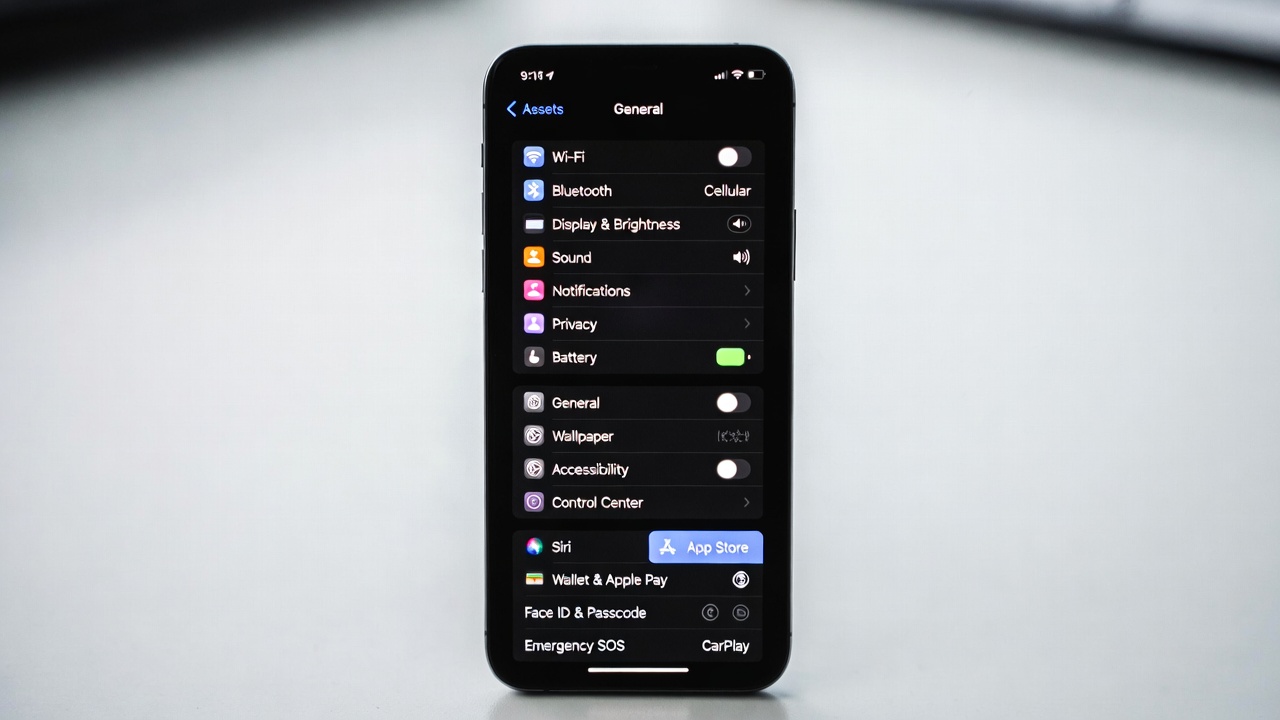 Most of us interact with maybe 30% of what’s actually on this screen.
Think about the last time you used your phone’s built-in health tracking beyond maybe checking step count. Or the document scanner that lives inside your camera app. Or the focus modes. Or live captions. Or even something as basic as the back-tap shortcut that lets you double or triple-tap the back of your phone to trigger any action you want.
These aren’t hidden features. They’re features that were announced at keynotes, written about in tech blogs, and downloaded onto your device automatically. They’re just… sitting there.
Here’s a rough breakdown of where the average person’s phone usage actually goes:
| Feature Category | % of Users Who Use It Regularly | Typical Unlock Method |
|---|---|---|
| Calling & Messaging | 97% | Home screen |
| Social Media / Streaming | 91% | Home screen apps |
| Camera (basic photo) | 88% | Camera app |
| Maps / Navigation | 76% | Direct app open |
| Mobile Payments | 41% | Sometimes remembered |
| Built-in Health Tracking | 28% | Rarely opened |
| Focus / Do Not Disturb Modes | 22% | Set once, forgotten |
| Document Scanner | 14% | Most don’t know it exists |
| Back Tap / Gesture Shortcuts | 9% | Almost never configured |
| Live Captions / Accessibility | 7% | Assumed to be “for others” |
That table isn’t from a lab. It’s a composite from my conversations with people around me plus a handful of informal surveys I’ve read. But honestly — look at those numbers and tell me they feel wrong. They don’t. Because most of us know, at some gut level, that we’re using maybe a third of what’s there.
Why This Keeps Happening
Here’s what I’ve come to think after chewing on this for a while: it’s not laziness. At least, it’s not just laziness. There are a few real psychological and design forces working against us.
1. We Learn Our Phones Once and Stop
The first week with a new phone is the most curious week. You poke around, you explore, you accidentally stumble into settings you don’t understand. Then life takes over, and whatever workflow you’ve settled into becomes the workflow. The brain loves efficiency — once it finds a path that works, it stops looking for other paths.
This is actually a feature of cognition, not a bug. But it means that unless something forces you to discover a new capability, you won’t. Most of us would rather do a five-step workaround that we know than a two-second shortcut that requires ten minutes of setup.
2. Feature Discoverability Is Broken
The companies making these phones are not, on the whole, great at surfacing features in context. You get a tip notification once, you dismiss it, and it never comes back. Or the feature is buried three levels deep in Settings under a name that doesn’t quite match what you’re looking for. Or it’s available only through a gesture that you’d never guess existed.
I’m not letting users entirely off the hook here — but the design of discoverability on most phones is genuinely poor. When a useful feature requires that you already know to look for it, that’s a design failure.
3. “I’ll Learn That Later” Is a Lie We Tell Ourselves
We all say it. When you skip the setup wizard, when you close the tutorial popup, when you see a new setting and think “I’ll come back to this.” You won’t come back to it. I won’t either. Nobody does. “Later” is where features go to die.
The cognitive cost of stopping what you’re doing to learn something new feels higher in the moment than it actually is. And so we defer, and defer, and two years pass and you’re still doing the five-step screenshot-and-crop routine.
💡 Speaking of habits that form without us noticing — I wrote about how Call of Duty Mobile actually taught me real-life discipline. The same pattern shows up there: we assume mastery takes time we don’t have, so we never even start.
The Features Worth Actually Learning
Not everything in the feature graveyard deserves resurrection. Some stuff is genuinely niche. But there are a handful of things that, once you start using them, you’ll wonder how you ever lived without.
 There’s a real difference between picking up your phone with purpose and just picking it up.
Let me walk through the ones that changed my daily routine most significantly.
Back Tap (iPhone) / Quick Tap (Android): This one sounds gimmicky until you set it up. Double-tap the back of your phone runs whatever action you assign — open camera, take screenshot, run a shortcut, toggle flashlight. Once it’s muscle memory, it’s actually faster than anything else.
Built-in Document Scanner: Both iOS (via Notes or Files) and Android (via Google Drive or the camera app) have document scanning built in. Auto-perspective correction, multi-page support, PDF export. I deleted a standalone scanning app the day I discovered this.
Focus Modes: Beyond “Do Not Disturb,” most modern phones let you create context-specific modes — Work focus that allows only work contacts and apps, Personal focus that mutes everything work-related. I resisted setting this up for over a year. Now I can’t imagine not having it.
Live Captions: Real-time captions for any audio playing on your phone. Originally designed for accessibility, it’s genuinely useful for watching videos in a quiet room, following along in a noisy environment, or just when you forgot your headphones. It’s not perfect, but it’s surprisingly accurate.
Scheduled Summary / Notification Batching: Instead of being interrupted constantly, you can have notifications delivered in batches at times you choose. Morning, afternoon, evening. This one sounds small and is life-changing.
📱 If you’re on a Tecno device and want to go even deeper, I covered a full breakdown of the Tecno Camon 30 Pro hidden features — a lot of those are exactly the kind of thing most users scroll right past on day one.
Here’s a quick feature comparison across the major platforms:
| Feature | iPhone (iOS 17+) | Android (Pixel/Samsung) | Availability |
|---|---|---|---|
| Back Tap / Quick Tap | ✅ Accessibility settings | ✅ Accessibility / Gestures | Both |
| Document Scanner | ✅ Notes + Files | ✅ Google Drive + Camera | Both |
| Focus Modes | ✅ Focus in Control Center | ✅ Digital Wellbeing modes | Both |
| Live Captions | ✅ Accessibility | ✅ Pixel native, others vary | Both (varies) |
| Notification Summary | ✅ Scheduled Summary | ✅ Notification batching | Both |
| Satellite SOS | ✅ iPhone 14+ | ✅ Pixel 9 / some Samsung | Newer models |
| Screen Distance / Eye Care | ✅ Screen Time settings | ✅ Digital Wellbeing | Both |
The Deeper Problem: We Treat Our Phones Like Vending Machines
This is the part that actually bothers me when I sit with it.
We have these extraordinary devices — genuinely the most powerful personal computers that have ever existed, sitting in our pockets — and for most people, most of the time, the interaction pattern is: unlock, open the thing I always open, consume, lock.
There’s nothing wrong with that in isolation. But it means the phone is being used reactively, not intentionally. You’re not directing the tool — the tool (more accurately, the apps on it) is directing you.
The features that go unused are largely the ones that require you to set up something in advance, to configure an intent, to say “I want my device to work this way for me.” Focus modes require setup. Shortcuts require thinking through your workflow. Back tap requires you to decide what you want to happen. These all involve agency.
And agency takes effort. Especially when the alternative — just scrolling — requires none.
 The phone is ready. The question is whether you are.
This isn’t a moral judgment. I’m not going to tell you to optimize your digital life into some kind of productivity monastery. But there’s something worth noticing: the features that ask the most of you upfront tend to give the most back over time. And the features that ask nothing — the infinite scroll, the algorithmic feed, the notification badge — tend to extract from you more than they give.
🔧 There’s also a hardware side to this. It doesn’t matter how many features your phone has if the device doesn’t hold up. I did a thorough look at whether Xiaomi phones are actually durable — worth a read if you’re deciding on your next device.
A Practical Approach to Closing the Gap
If you want to actually start using more of your phone’s capabilities, here’s what I’d suggest — and it’s not “read every article about hidden iPhone features” because that doesn’t work. You read the list, feel briefly informed, and change nothing.
Instead, try this: One feature, one week. Pick a single unused feature, configure it completely in one sitting (doesn’t matter if it takes 20 minutes), and then use it every day for a week. Just one. By the end of the week it either sticks or it doesn’t, but you’ll know — and you’ll have genuinely evaluated it rather than theoretically appreciated it.
Here’s a starter list ordered by effort-to-payoff ratio:
| Feature | Setup Time | Daily Time Saved | Difficulty |
|---|---|---|---|
| Back Tap shortcut | 3 minutes | 30–60 sec/day | Easy |
| Built-in document scanner | 5 minutes | Replaces an app | Easy |
| Notification summary | 5 minutes | Significant focus gain | Easy |
| One Focus mode | 15 minutes | Highly variable | Medium |
| Custom Shortcuts automation | 30–60 minutes | High if used | Medium–Hard |
| Home screen reorganization | 20–30 minutes | Moderate | Easy–Medium |
🍎 And if you’re specifically on an iPhone, I put together real-world tips for the iPhone 17 Pro Max that go way beyond what Apple shows you in the setup guide. A great companion read to this one.
The Honest Takeaway
The reason most people don’t use 50% of their smartphone features isn’t that the features are bad, or too complex, or not worth knowing about. It’s that habit is powerful, discoverability is broken, and the path of least resistance leads straight to the same four apps you always open.
The phone in your pocket right now is capable of more than you’re asking of it. Not in a “you’re wasting potential” guilt-trip way — but in a genuinely useful, these-things-might-actually-help-you way.
My friend who one-gestured through my five-step process didn’t have a better phone than me. She’d just spent twenty minutes one afternoon going through her accessibility settings and found something she liked. That’s the whole difference.
 Twenty minutes between fumbling and fluent.
Twenty minutes. That’s the gap between fumbling and fluent.
You probably won’t use 100% of your phone’s features — and you shouldn’t, because some of them genuinely don’t apply to your life. But closing the gap from 30% to 45% usage? That’s a real quality-of-life improvement, and it’s sitting there waiting for you right now, buried three levels deep in Settings, next to a toggle you’ve scrolled past a hundred times.
Frequently Asked Questions
Q: Is it actually worth taking time to learn phone features I might not use?
Honestly — not all of them, no. The mistake is treating this as an all-or-nothing project. You don’t need to know everything your phone can do. But most people haven’t evaluated what their phone can do at all. The goal isn’t mastery, it’s awareness. Even knowing that a feature exists means you can reach for it when it becomes relevant.
Q: Why do manufacturers bury features instead of making them easy to find?
It’s a combination of things. Phones serve wildly different audiences, so features that are critical for one person are clutter for another. There’s also a product tension between simplicity (fewer things visible = easier to learn) and capability (more things accessible = more powerful). Most manufacturers err toward simplicity on the surface and dump capability into Settings, which means the people who would benefit most from advanced features are least likely to find them.
Q: My phone is a few years old. Are these features available to me?
Many of them, yes. Focus modes, document scanning, live captions, and notification batching have been available on both major platforms for several years now. Some newer features like satellite SOS or certain AI-powered tools do require recent hardware. But for most of what I’ve highlighted above, you likely already have it — it’s just waiting in Settings.
Q: I’ve tried setting up shortcuts and Focus modes before and stopped using them. What’s different this time?
Probably nothing, unless your daily life has changed enough that the friction now makes sense. The key insight: don’t try to build a system. Systems feel good to design and terrible to maintain. Instead, solve one specific, real problem you have right now. If you get interrupted constantly during deep work, fix that exact thing. One Focus mode, set up properly. That’s it. Don’t build the whole productivity machine.
Q: Are there features I should specifically avoid or turn off?
Yes. Not every feature is beneficial. Raise-to-wake and always-on display drain battery and can increase mindless checking. Notification badges on social apps create anxiety loops. Some “smart” suggestions like predictive text and app recommendations feel helpful but can quietly train you to be less intentional. The best phone setup isn’t the one with the most features on — it’s the one configured deliberately to match how you actually want to live.
Q: How do I find features I don’t even know exist?
The best method I’ve found: once a month, go into Settings and scroll slowly through a section you’ve never fully read. Not to change anything necessarily — just to be aware. You will find something surprising almost every time. The second method: when you see someone do something on their phone that looks faster than how you do it, ask them immediately. Don’t make a mental note. Ask right there.
Q: What’s the single most underrated smartphone feature right now?
Back tap, without question. I know I’ve mentioned it already, but the fact that you can trigger any action — any shortcut, any app, any system function — with a quick double-tap on the back of your phone, and that almost nobody uses it, is genuinely wild. Set it to open your camera. Or your notes app. Or run a shortcut that logs your water intake. Wide possibilities, under five minutes of setup.
If this resonated with you, the best thing you can do right now is put your phone down, pick it back up with fresh eyes, and actually spend twenty minutes in Settings. Not to change everything — just to see what’s there. You might surprise yourself.

Comments 0
Leave a comment