Table of Contents
Open Table of Contents
Overview
Every Flip generation raises the same question: is this the year I swap? With the Galaxy Z Flip8, the honest answer for most Flip7 owners is no. Samsung did real work on the body, the processor and the cover-screen software, but the screen sizes, camera sensors and battery capacity did not move.
This post is research-based, built from Samsung’s published specs and launch coverage rather than our own testing. Where sources disagree, we say so.
What actually changed
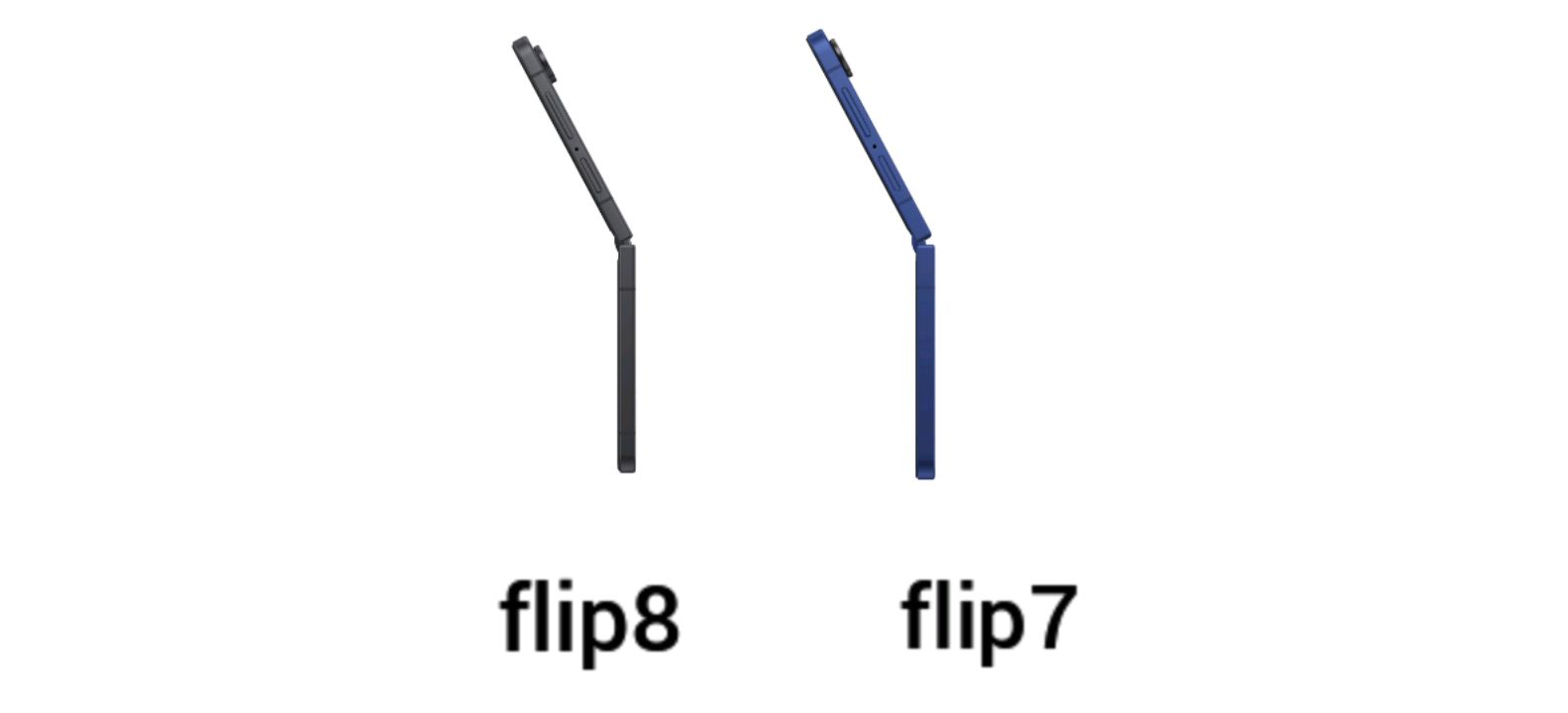
The Flip8 was announced on 22 July 2026 and went on sale on 7 August. The biggest visible change is the body. It folds down to 13.1mm, against 13.7mm on the Flip7, and unfolds to about 6.1mm instead of 6.5mm. It also weighs roughly 180g, down from 188g. Eight grams will not change your life, but a flip phone lives in a pocket, and thinner matters there more than on a slab phone.
Samsung also slimmed the cover-screen bezels and says the hinge is stronger. The Flip8 ships with Android 17 and One UI 9, while the Flip7 launched on Android 16 and One UI 8.
Specs side by side
| Spec | Galaxy Z Flip8 | Galaxy Z Flip7 |
|---|---|---|
| Announced | 22 July 2026 | 9 July 2025 |
| Folded thickness | 13.1mm | 13.7mm |
| Unfolded thickness | ~6.1mm | ~6.5mm |
| Weight | ~180g | ~188g |
| Main display | 6.9-inch Dynamic AMOLED 2X, 1–120Hz | 6.9-inch Dynamic AMOLED 2X, 1–120Hz |
| Peak brightness | 2,600 nits (Samsung); ~2,150 nits measured by Tom’s Guide | 2,600 nits (Samsung); ~1,989 nits measured by Tom’s Guide |
| Cover display | 4.1-inch, slimmer bezels, new apps tray in One UI 9 | 4.1-inch |
| Chip | Varies by region: Exynos 2600 (global, UK and India listings); Snapdragon 8 Elite Gen 5 for Galaxy (Samsung Canada, Tom’s Guide’s US review) | Exynos 2500 |
| Rear cameras | 50MP main + 12MP ultrawide | 50MP main + 12MP ultrawide |
| Selfie camera | 10MP | 10MP |
| RAM / storage | 12GB, 256GB or 512GB | 12GB, 256GB or 512GB |
| Battery | 4,300mAh | 4,300mAh |
| Charging, Samsung’s claim | About 55% in 30 minutes (25W adapter) | About 50% in 30 minutes (launch claim) |
| Charging, independent test (Tom’s Guide) | 35% in 15 minutes, 59% in 30 minutes | 29% in 15 minutes, 55% in 30 minutes |
| Software at launch | Android 17, One UI 9 | Android 16, One UI 8 |
| US starting price | $1,199.99 | $1,099.99 |
Performance is the real upgrade
Samsung publishes different performance claims depending on the chip. For the Exynos 2600 version, coverage citing Samsung’s specifications lists about 30% faster CPU, 25% better graphics and 41% faster NPU than the Flip7. For the Snapdragon 8 Elite Gen 5 for Galaxy version, Samsung Canada’s product page lists 41% faster CPU, 11% improved graphics and 43% faster NPU, again compared with the Flip7. All of these are Samsung’s own figures, not independent benchmarks, so treat them as direction, not a promise.
Which chip you get appears to depend on where the phone is sold. UK, India and global listings name the Exynos 2600. Samsung Canada’s product page and Tom’s Guide’s US review name the Snapdragon 8 Elite Gen 5 for Galaxy. One Canadian retailer listing still says Exynos 2600, so published sources do not fully agree, and we are not presenting either chip as universal. Tom’s Guide’s benchmark gains over the Flip7 (Geekbench 6 and 3DMark) come from its Snapdragon unit and may not carry over to an Exynos model. If you are buying in Nigeria, confirm the chip on the exact model and carrier variant before paying.
The Flip7 was not slow to begin with. If your phone already handles your games and apps without stutter, a faster chip is a nice-to-have.
Display: same panels on paper, a few differences underneath
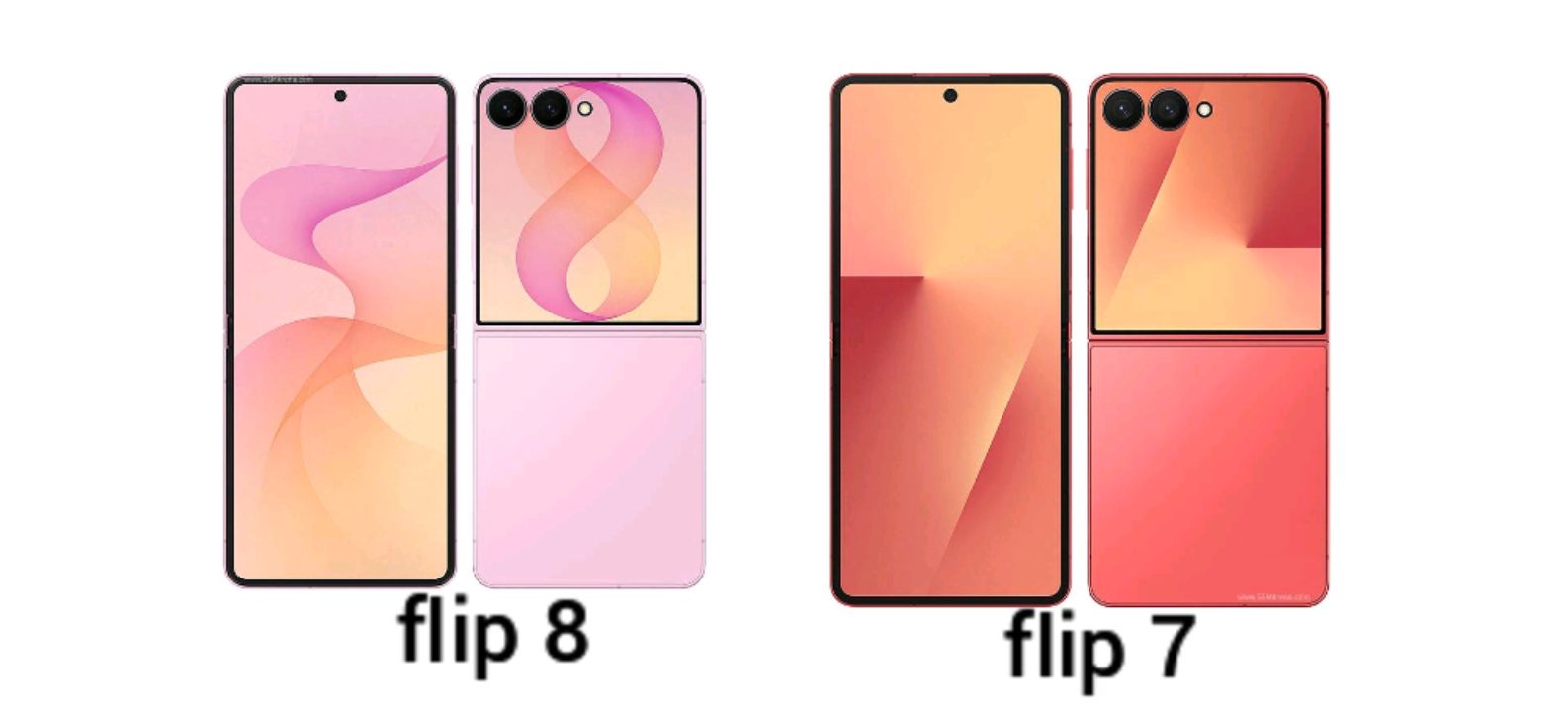
Screen size, resolution and refresh rate are unchanged: 6.9 inches inside with an adaptive 1–120Hz, and a 4.1-inch cover screen. If you are hoping for a sharper or larger display, that is not what the Flip8 offers.
Brightness is where the story gets less tidy. Samsung’s published peak is 2,600 nits for both phones, and several comparison sites list them as identical. Tom’s Guide, however, reported measuring about 2,150 nits on the Flip8’s main screen against 1,989 on the Flip7, and one UK retailer’s review says Samsung states the brightness was dialled up. We could not trace that gain to a Samsung spec line, so treat it as one reviewer’s measurement, not a confirmed hardware change. It is also a reminder that peak nits describe a small bright area for a short time, not what you see across the whole screen. Our HONOR 600 Lite vs Galaxy A56 brightness comparison explains the difference between typical, high-brightness and peak figures. If you read nits in direct sun, that is the page to read first.
The cover screen changed more than its spec line suggests. The hardware is the same size, but reviewers point to slimmer bezels and a software overhaul in One UI 9: an apps tray you can open on the cover screen, widgets you can rearrange without unfolding the phone, and quicker access to brightness and notifications. For a flip phone, the cover screen is where you spend much of your day, so this matters more than the “no upgrade” label implies.
Cameras: same sensors, but not necessarily the same results
The Flip8 keeps the Flip7’s 50MP main camera with OIS, 12MP ultrawide and 10MP selfie camera. On hardware, nothing changed. Tom’s Guide’s side-by-side shots found everyday photos and 10x zoom close to identical, with the one clear gain in near-pitch-dark scenes, where the Flip8 produced brighter results than the Flip7. That is one reviewer’s comparison, not a lab test.
Still, identical sensors do not guarantee identical photos. Processing, the new chip and software features all shape the final image. Tom’s Guide describes Horizontal Lock, a new option inside Super Steady video mode that keeps footage level however you hold the phone, at the cost of a slight crop. The cover screen as a viewfinder works the same way it did last year. For a sense of how much processing and tuning can matter even when headline specs look close, see our Pixel 10 vs Pixel 10 Pro camera and battery breakdown. The honest summary: expect similar daytime photos, a possible low-light edge, and steadier handheld video.
Battery: new cell, same capacity
Both phones carry 4,300mAh. Some outlets report the Flip8 uses Samsung’s first silicon-carbon cells, but we could not confirm that wording from Samsung itself, so we are not treating it as settled. Charging is where claims and measurements need separating. Samsung says the Flip8 reaches about 55% in 30 minutes with a compatible 25W adapter, against about 50% for the Flip7 in its launch test. Those are manufacturer figures under Samsung’s lab conditions. Tom’s Guide’s own tests logged 59% for the Flip8 and 55% for the Flip7 in 30 minutes, and 35% against 29% at 15 minutes. Different tests, different numbers, same direction: a small gain.
That is still modest. Rivals have pushed far past 4,300mAh, as in the vivo V50 with its 6,000mAh battery and the OnePlus Nord 5 with 5G on. Those are slab phones, and a clamshell has less room for a cell. Still, if battery life is your top priority, no Flip will lead that race.
Should you upgrade?
| If you own | Our take |
|---|---|
| Galaxy Z Flip7 | Skip it. The gains are small and the price went up by $100. |
| Galaxy Z Flip6 or older | Worth a look. The larger screens, newer chip and longer software runway are meaningful jumps. |
| A slab phone, new to foldables | Compare the Flip8 against a discounted Flip7. Prices vary by region and retailer, so check current listings. |
| Budget around $300 | A flip is out of reach. See best Samsung 5G phones under $300. |
Software support also deserves a thought. Longer update promises favour the newer phone, though the Flip7 will stay supported for years. We cover the policy in how long Samsung phones get updates.
FAQ
Is the Galaxy Z Flip8 worth upgrading to from the Flip7?
For most people, no. Screen sizes, camera sensors and battery capacity are unchanged. The thinner body, faster chip and better cover-screen software are nice, but not enough to justify a $100 higher starting price.
Does the Flip8 have a better camera than the Flip7?
The sensors are the same: a 50MP main camera, a 12MP ultrawide and a 10MP selfie camera. Tom’s Guide found everyday photos nearly identical, with a gain only in near-dark scenes, and the Flip8 adds Horizontal Lock for steadier video.
Is the Flip8 display brighter than the Flip7?
Samsung lists 2,600 nits peak for both. One reviewer measured about 2,150 nits on the Flip8 and 1,989 on the Flip7, so there may be a small real-world gain, but we could not confirm it from Samsung and it is one source.
Is the Flip8 battery bigger?
No. Both are 4,300mAh. Samsung claims about 55% in 30 minutes for the Flip8 against about 50% for the Flip7. Tom’s Guide measured 59% against 55%.
Which chip does the Flip8 use?
It depends on the region. Exynos 2600 appears in global, UK and India listings, while Samsung Canada and Tom’s Guide’s US review list the Snapdragon 8 Elite Gen 5 for Galaxy. Published sources are not fully consistent, so verify the exact regional model before buying.
Is the Flip8 more durable than the Flip7?
Samsung says the hinge is stronger, but reviewers note the body is thinner and lighter rather than tougher. Independent durability testing is the thing to wait for.
Should I buy the Flip7 instead now?
If you want the cheapest way into a Samsung flip, a discounted Flip7 is a sensible choice. Compare current prices where you live, since they change often.

Comments 0
Leave a comment