Table of Contents
Open Table of Contents
Overview
There is a version of this post I could write where I tell you AI has transformed my blogging workflow and everything is smooth and automated. That version is dishonest. The real version is that I spent months figuring out what these tools are actually good for, broke my blog multiple times in the process, and eventually landed on a system that works — not because it is perfect, but because it is honest about what each tool can and cannot do.
I run ReviByte with two AI tools. ChatGPT on the content side. Claude when I am inside the code. They do not do the same job. The moment I tried to use one for everything, I felt the gap. This is how I actually use both of them — and why the split matters more than people admit.
Where I Start: The Content Side with ChatGPT
When I sit down to write a new post for ReviByte, the first thing I need is not a draft. It is clarity on what I am actually arguing. A phone comparison post sounds simple until you realise there are five different angles you could take, three audiences you could write for, and a dozen ways to frame the conclusion.
ChatGPT is where I work that out.
I will open a conversation and describe the post I have in my head. Not a formal prompt — more like thinking out loud. “I want to compare three Transsion phones for Nigerian buyers under ₦300,000, the Note 60 Pro, Hot 60 Pro and Spark 40 Pro — what are the angles worth covering?” What comes back is fast, wide, and gives me something to react to. I do not use it directly. But reacting to a suggested structure is ten times faster than staring at a blank document waiting for one to come out of my head.
That is how the Infinix Note 60 Pro vs Hot 60 Pro vs Tecno Spark 40 Pro comparison got its shape. I knew what the phones were. I knew the Nigerian buyer context. ChatGPT helped me figure out the right order — lead with who each phone is actually for, then do display, then performance, then the battery section last because in Nigeria, battery is not a spec, it is a survival decision. That framing came from a back-and-forth. The actual writing was mine.
The same process applied to the Pixel 10 vs Galaxy S26 comparison. I had the facts. What I needed was a hook that did not sound like every other comparison review. ChatGPT threw out five possible angles and one of them sparked the direction I actually took — these are the phones most people actually buy, not the Ultras, not the Pro Max models — and that became the core of how I opened the post.
 ChatGPT as a thinking partner — not a writer, but a fast reactor that helps me find my angle
For FAQ sections, I also lean on ChatGPT. Not to write the answers — I write those. But to generate the questions. It is very good at asking the obvious questions that a reader would ask but that I, as someone who already knows the topic, might skip over. That is a real blind spot and ChatGPT patches it consistently.
The key thing I have learned: ChatGPT is a thinking partner, not a ghostwriter. The moment I try to publish what it gives me directly, the writing becomes flat. The opinions are vague, the voice disappears, and everything sounds like it was written for everyone and therefore for no one. I use it to get unstuck, not to replace the actual work.
The Code Side: Where Claude Comes In
This is where things get specific — and honestly, where the collaboration has been more intense.
ReviByte runs on Astro, deployed on Vercel, with a GitHub repo I maintain myself. I am a Physics and Electronics student, not a professional developer. I understand what I am doing well enough to build things, but debugging a framework I did not build from scratch, with a codebase that sometimes throws errors I have never seen before, is a different thing entirely.
Claude is who I bring those problems to.
 The kind of session where something is broken and I need to understand why before I touch anything
Some of the most important fixes ReviByte has ever had came out of conversations with Claude. Let me be specific about a few of them.
The sitemap filter bug. My astro.config.ts had a malformed template literal inside the sitemap filter function. It was blocking tag pages from being included in the sitemap entirely — which meant Google could not find my tag pages, and the internal linking structure I had built was pointing toward pages that Google would not crawl. I had stared at that config file for longer than I want to admit. Pasted it in, explained the symptom, and Claude caught it. Not “here is a possible issue” — it identified exactly where the template literal was wrong and explained why that specific syntax would break the filter evaluation. That kind of precise fault identification is what I needed.
The getPath.ts trailing slash problem. This one was quietly causing redirect loops on post URLs. Every time Google tried to crawl a post page, it was being bounced between the trailing slash and non-trailing slash version without ever resolving cleanly. Indexing was suffering. The fix involved understanding how AstroPaper resolves paths internally and where the mismatch was happening between Vercel’s routing behaviour and the expected output. Claude worked through it with me — I shared the relevant files, explained what GSC was showing, and we traced it back to the source. That fix directly improved how many posts Google was willing to index.
The image sitemap. This one I wrote about in full detail — how I fixed Google image sitemap on my Astro blog and got posts indexed faster. The short version: Google was attributing my post cover images to my homepage instead of the actual posts, because the default Astro sitemap includes the image XML namespace but populates zero image data. I needed a custom sitemap-post-images.xml.ts file that explicitly mapped every post URL to its cover image with absolute paths. Claude helped me build it — the TypeScript, the XML structure, the frontmatter field handling, the fallback logic. GSC confirmed 39 image entries processed. That was a real win that came directly from a collaborative session.
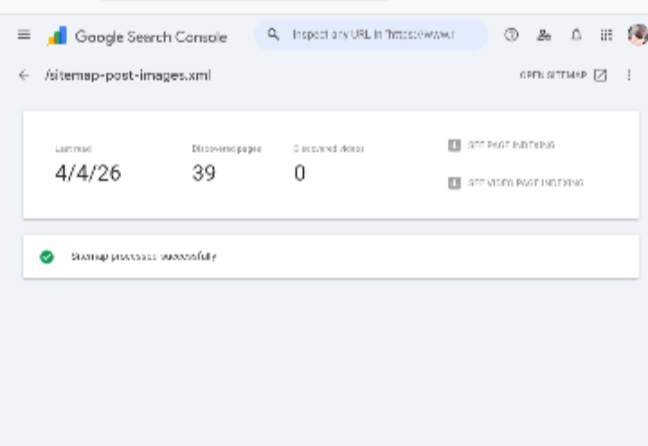 39 images. One for every post. This is what a working image sitemap looks like in GSC.
The push notification automation. For months, ReviByte had subscribers who opted into push notifications and heard absolutely nothing. I had OneSignal installed and functioning, but there was no bridge between publishing a post and actually sending a notification. The fix was Zapier — but understanding exactly why OneSignal alone was not enough, how the RSS trigger needed to be configured, and what was actually happening when nothing fired — that was a conversation I had with Claude. The full breakdown is in why my blog had no push notifications for months. The 20-minute setup felt simple once I understood the architecture. Getting to that understanding was not simple.
What I have noticed about working with Claude on code is that it does not just hand me a solution and end the conversation. If I share a file and describe a symptom, it asks the right question back or explains the underlying reason the bug exists. That matters more than I expected. When I understand why something broke, I do not repeat the same mistake in a different file two weeks later.
How the Two Tools Actually Divide the Work
This is the honest picture of my workflow:
| Task | Tool | Why |
|---|---|---|
| Post angle and framing | ChatGPT | Fast, wide, good at suggesting structures to react to |
| FAQ question generation | ChatGPT | Catches the obvious reader questions I overlook |
| Title brainstorming | ChatGPT | Generates variations quickly for me to pick from |
| Comparison table structure | ChatGPT | Good at organising multiple specs into logical rows |
| Astro config debugging | Claude | Precise fault identification in unfamiliar code |
| Structured data / schema markup | Claude | Article, FAQPage, AggregateRating — Claude builds these accurately |
| TypeScript file creation | Claude | Sitemap generators, utility files, content collection queries |
| Understanding why something broke | Claude | Explains root cause, not just the fix |
| Actual writing | Me | Always. This part does not get delegated. |
The last row is not a throwaway line. Everything above it is about getting to the writing faster or getting the technical infrastructure right. The writing itself — the opinions, the Nigerian market context, the personal framing, the voice — that is mine. That is also the only part of ReviByte that cannot be replicated. Anyone can set up Astro. Anyone can run a sitemap. The perspective is the product.
What I Have Learned That Nobody Tells You
Using AI tools for a blog sounds like a productivity shortcut. In practice it is more like having two very different collaborators — one good at broad thinking, one good at deep precision — and learning when to call which one.
The mistake I made early was trying to get ChatGPT to write sections of posts for me and then editing them. It felt faster. It was not. The editing took longer than writing from scratch because I was fighting the wrong voice the whole time, trying to replace generic sentences with something real. I stopped doing that. Now I use it exclusively to think, not to produce.
The mistake with Claude was using it as a last resort — only when something was seriously broken. I should have been using it earlier in the process for technical decisions, not just for debugging. Understanding the architecture before building it would have saved me some of the problems I had to fix later.
 The actual workflow — not glamorous, but functional. Content in one tab, code in another, and the right tool for each.
The other thing worth saying: both of these tools make me better at what I already do. They do not replace the skill. I needed to understand Astro well enough to explain the problem clearly before Claude could help me fix it. I needed to know my audience well enough to know which ChatGPT suggestion was worth pursuing. The tools amplify what is already there. They do not substitute for it.
That is probably the most honest thing I can say about running a blog with AI in 2026.
Tool Comparison at a Glance
| Feature | ChatGPT | Claude |
|---|---|---|
| Content brainstorming | Excellent | Good |
| Code debugging | Adequate | Excellent |
| Explaining root causes | Sometimes | Consistently |
| Long document handling | Good | Very good |
| Voice/tone matching | Inconsistent | Better with context |
| Speed for quick tasks | Very fast | Fast |
| Best use on ReviByte | Ideation, structure, FAQs | Astro code, schemas, technical fixes |
Neither tool is universally better. They are different. That is the whole point.
Frequently Asked Questions
Do you use AI to write your posts? No. Every post on ReviByte is written by me. I use AI tools to help with structure, brainstorming, and technical fixes — but the actual writing, the opinions, the voice, and the analysis are mine from start to finish.
Which AI tool is better for blogging — ChatGPT or Claude? It depends on what you mean by “blogging.” For content ideation, outlines, and quick title variations, ChatGPT moves faster. For technical work — debugging, schema markup, build configuration — Claude is more precise and better at explaining why something is wrong. Most serious bloggers will end up using both.
Can Claude actually help with Astro code? Yes, and in my experience better than most other tools I have tried. It handles TypeScript, understands the Astro content collection API, and when I share actual file content and explain the symptom, it identifies problems accurately rather than giving generic advice.
Does using AI for brainstorming make your content less original? Not if you treat the output as raw material to react to, not as a draft to polish. The originality comes from what you choose to keep, what you reject, and what you add from your own experience and perspective. The tool suggests; you decide.
How long does it take to write a post on ReviByte with this workflow? Anywhere from four to eight hours for a full comparison post. The AI tools cut maybe 30–40 minutes off the ideation and structure phase, and save me significant time on technical fixes that would otherwise require hours of searching through documentation. The writing time itself has not changed — that still takes as long as it takes.
Is this workflow applicable to other blog setups, not just Astro? The content side of this workflow applies to any blog regardless of platform. The technical side is Astro-specific, but the principle — use Claude when you have a code problem and need to understand the root cause, not just the solution — applies to WordPress, Hugo, or anything else you are building on.
ReviByte is still a young blog. The technical foundation is solid now in a way it was not six months ago, and a lot of that is because I stopped trying to figure out everything alone. Two tools, clear boundaries on what each one does, and the actual work still sitting entirely with me. That is the system. It is not flashy. But it works.