
Table of Contents
Open Table of Contents
Overview
Every semester, a new wave of “AI tools that will change your life as a student” lists shows up, and most of them just repeat the same five apps with different screenshots. I wanted to actually break down which tools are worth your time in 2026, what they’re good at, and where they fall apart — because not every tool deserves a spot on your home screen.
The honest answer is that no single AI tool does everything well. The students getting real value out of AI right now are usually running two or three tools side by side, each one handling a different part of the workload.
Quick picks
If you only read one section, read this one.
- Best overall: ChatGPT
- Best for research: Perplexity
- Best for lecture notes: NotebookLM
- Best for writing improvement: Grammarly
- Best for math: Wolfram Alpha
Keep reading for why, and where each one actually falls short.
What’s worth using right now
For writing and brainstorming, ChatGPT and Claude are still the most flexible options. They’re good at turning a vague essay prompt into three workable thesis options, or explaining why a formula works instead of just handing you the formula. The mistake students make is using them to write the final draft instead of using them to think out loud first.
 [PLACEHOLDER: screenshot of a real ChatGPT or Claude conversation showing essay outlining or concept breakdown]
For research, Perplexity stands out because it shows its sources alongside the answer, which makes it far easier to fact-check than a regular chatbot. If you’re pulling together five sources for a literature review, it saves you from opening five separate tabs and losing track of which claim came from where.
For digesting lecture material, NotebookLM has become a favorite for a reason. You upload your actual notes, slides, or readings, and it’s designed to ground its answers in your uploaded sources, which can make studying from your own materials a lot easier. That’s the difference between turning a 20-page reading into usable revision notes the night before an exam, versus re-reading the whole thing cover to cover at 1am.
 [PLACEHOLDER: screenshot of NotebookLM turning uploaded notes into a summary or Q&A]
For writing polish, Grammarly is still the default, and for good reason — it catches when an email to a professor reads too casually, or when a sentence in your essay is technically correct but unclear.
For memorization, Quizlet’s AI-generated flashcards and practice tests turn a messy set of biology or vocabulary notes into a 40-card deck you can actually drill on the bus.
For math and science, Wolfram Alpha is in a different category from the rest. It computes instead of guessing, so you can check a calculus answer step by step instead of just getting a final number that may or may not be right — which matters when a wrong answer costs you marks.
Related reading
Quick comparison
| Tool | Best for | Free plan | Paid plan starts at |
|---|---|---|---|
| ChatGPT | Brainstorming, explanations, coding help | Yes, limited | $20/month |
| Claude | Long documents, essay structuring | Yes, limited | $20/month |
| Perplexity | Source-backed research | Yes, limited | $20/month |
| NotebookLM | Summarizing your own notes/lectures | Yes | Free for most student use |
| Grammarly | Grammar, tone, clarity | Yes | $12/month |
| Quizlet | Flashcards, practice tests | Yes | $7.99/month |
| Wolfram Alpha | Math, physics, computation | Yes, limited | $5.99/month |
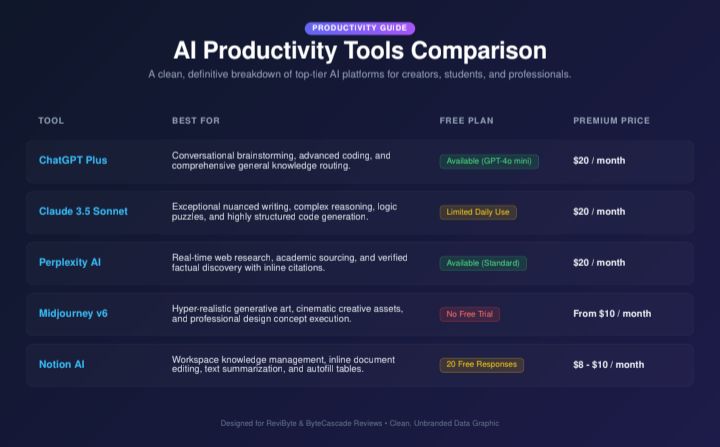 [PLACEHOLDER: original comparison graphic — could reuse the table above as a designed image for social sharing]
Prices and limits shift fairly often, so treat this as a starting point rather than gospel — check the tool’s own pricing page before you commit to a subscription.
A quick note on academic integrity
Most schools are fine with AI as a study aid and not fine with AI as a ghostwriter. The line usually comes down to whether the work submitted reflects your own understanding. Using ChatGPT to explain a concept you’re stuck on is very different from asking it to write your essay and turning that in as-is. When in doubt, check your school’s actual AI policy — they vary more than people expect.
FAQ
Do I need to pay for any of these tools? Not really, at least not at first. The free tiers of ChatGPT, Claude, Perplexity, and Quizlet cover most day-to-day student use. Paid plans mainly make sense once you’re hitting usage limits regularly or need a specific feature, like longer documents or faster response times.
Which AI tool is best for essay writing? None of them should write the essay for you. ChatGPT and Claude are best used for outlining, getting feedback on structure, or untangling a confusing argument. Grammarly is the better choice once you have a draft and want to tighten the language.
Is it safe to upload my lecture notes to NotebookLM? Generally yes, but avoid uploading anything with sensitive personal information attached, like a classmate’s contact details or graded papers with grades visible. Stick to your own notes, slides, and readings.
Can professors tell if I used AI? AI detection tools exist, but they’re unreliable and have flagged plenty of human-written work as AI-generated. The safer approach isn’t trying to “beat” detection — it’s using AI for support rather than substitution in the first place.



Comments 0
Leave a comment