Table of Contents
Open Table of Contents
Overview
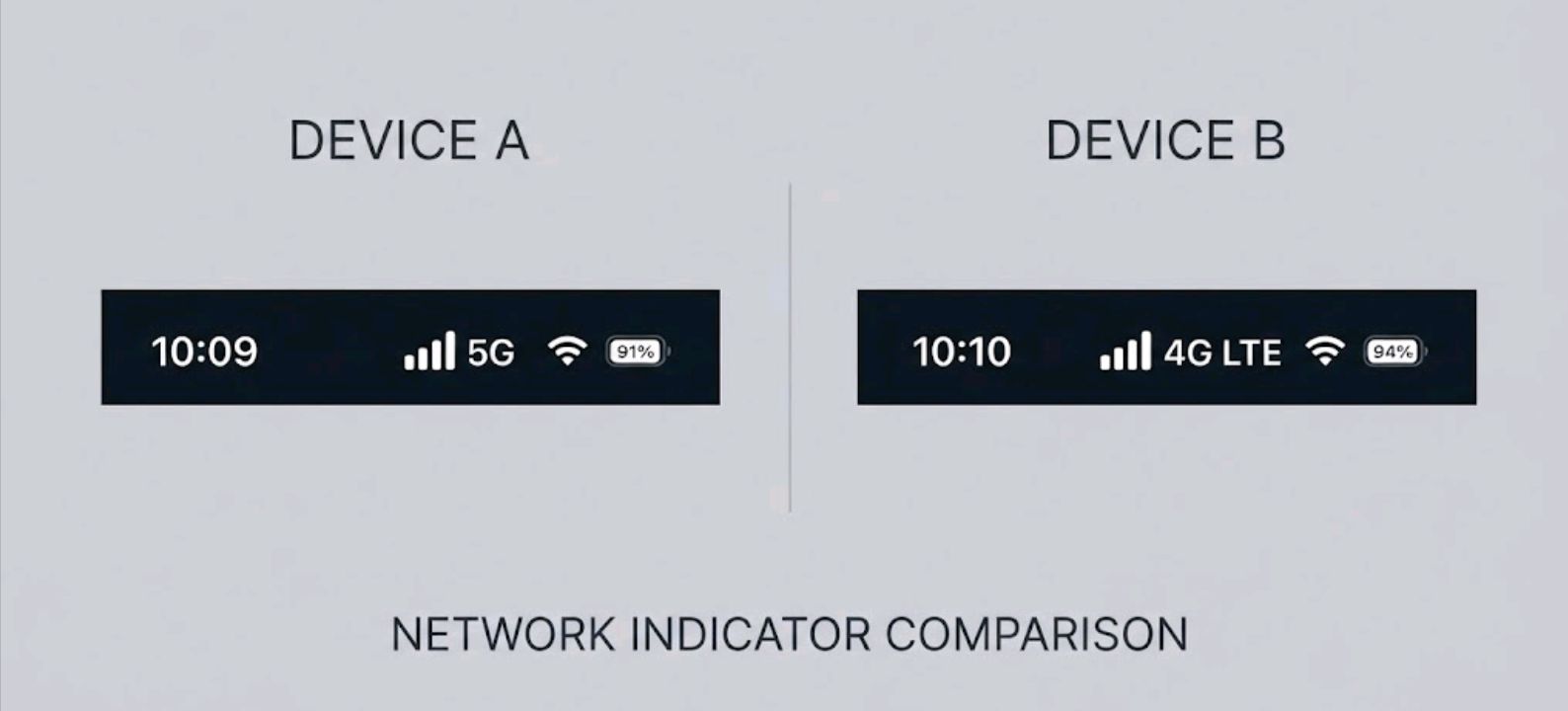
You bought a phone with 5G written right there on the spec sheet. You’re paying for a 5G plan. And yet, half the time you glance at your status bar, it says “4G” or “LTE” like the last five years never happened. Here’s the short answer: a 5G-capable phone only means the hardware can connect to 5G. It doesn’t mean 5G will be available at every location, on every carrier, or at every moment. If that’s been bugging you, you’re not imagining it — this is one of the most common complaints phone owners bring up, right alongside battery drain and random reboots. Turns out most of these quirks are normal — we broke down a bunch of them in weird Android problems that are actually normal, and the 5G-to-4G flip-flop belongs on that list too.
Join ReviByte Community
Get instant alerts on new posts, phone deals, and mobile gaming updates.
Join WhatsApp ChannelIt’s Not Your Phone — It’s Usually the Network
Here’s the part carriers don’t put on billboards: 5G isn’t one single thing. It spans different frequency bands, different deployment modes (like NSA and SA), and — in a lot of real-world cases — a spectrum-sharing technique that blurs the line between 5G and 4G entirely. Here’s roughly how the main frequency tiers stack up:
| 5G Type | Real-World Range | Speed | How Common It Is |
|---|---|---|---|
| mmWave (high-band) | A few hundred meters, blocked by walls | Extremely fast (1+ Gbps) | Rare, mostly stadiums/downtown corners |
| Mid-band | 1-2 km | Fast, solid everyday speeds | Growing, but patchy outside cities |
| Low-band 5G (often using DSS) | Similar to 4G towers | Performance can beat LTE, but the gain varies a lot | Widest coverage, smallest guaranteed upgrade |
That last row is the trap. Some carrier coverage maps include substantial areas of low-band 5G, and some low-band deployments use Dynamic Spectrum Sharing (DSS), which allows LTE and 5G to share the same spectrum dynamically rather than splitting it into separate bands. Low-band 5G under DSS can still outperform LTE, but by how much depends on the carrier’s configuration, tower congestion, and your device. And the reverse happens too: your phone gives up and falls back to LTE because the 5G signal at your exact spot is too weak to hold, even though a nearby tower is broadcasting 5G just fine.
The Usual Suspects
Before blaming your carrier, it’s worth ruling out a few things on your end first.
- Battery-saving mode is on. This one’s device-specific rather than universal: Google says some Pixel phones will use 4G instead of 5G while Battery Saver is enabled, and Apple says Low Power Mode disables 5G on most iPhones (with a few model and activity-based exceptions), while the separate “5G Auto” setting can independently switch between 5G and LTE to save power. The exact trigger depends on your phone and software version.
- You’re using an eSIM or a secondary line that wasn’t provisioned for 5G by your carrier, even on a 5G phone.
- Your SIM or eSIM profile is outdated. After a carrier-side network upgrade, this can happen — usually fixed with a SIM refresh or a call to support.
- Your preferred network type is set to LTE/4G-only. The exact menu name varies by manufacturer, but it’s usually somewhere in Settings > Network > Mobile Networks.
- You’re indoors, underground, or in a moving vehicle. Higher-frequency 5G bands generally have more limited propagation and weaker indoor penetration than lower-frequency cellular bands, so it doesn’t take much to knock the connection back to 4G.
A Quick Way to Check What’s Actually Happening
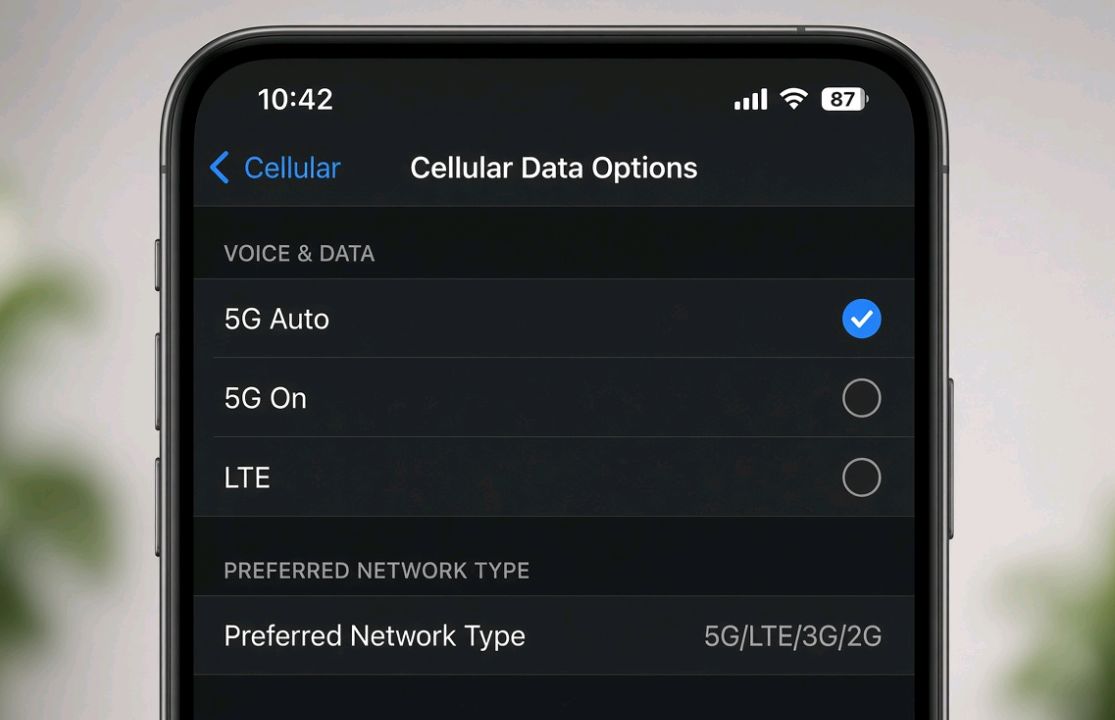
Some Android phones support the *#*#4636#*#* diagnostics code to show your actual radio band and signal type, though the code is unavailable or restricted on many devices depending on the manufacturer and software version, so treat it as worth trying rather than guaranteed to work. On iPhone, going to Settings > Cellular > Cellular Data Options > Voice & Data lets you confirm whether 5G Auto, 5G On, or LTE is selected — a setting a surprising number of people never touch after setup. Apple also notes that if 5G isn’t showing up at all, it’s worth checking whether your carrier and specific plan actually support 5G in your area, since not every plan includes it by default.
If you’re chasing better connectivity in general — not just 5G — it’s worth pairing this with how your phone handles charging and background tasks; we’ve got a rundown on phones with the best bypass charging for gaming and heavy use, since radio-heavy tasks and charging habits tend to intersect more than people realize. And if you’re on a Samsung device wondering whether an aging phone is even getting the network-related firmware updates it needs, this breakdown of how long Samsung phones get updates is worth a look too.
Why This Matters More in 2026
Coverage maps show estimated service areas, but actual connectivity can vary a lot by exact location, device, network congestion, and which frequency band is available nearby. Phones are also getting smarter about switching networks to save battery, which means seeing “4G” isn’t always a failure — sometimes it’s your phone making a sensible trade-off you never asked it to explain.
Troubleshooting Checklist
| Step | What To Do | Fixes This When… |
|---|---|---|
| 1 | Toggle Airplane Mode on/off | Your phone is stuck on a stale connection |
| 2 | Check Battery Saver status | Power-saving mode is silently capping speed |
| 3 | Reset Network Settings | SIM/APN configs got corrupted |
| 4 | Confirm your plan includes 5G access | Your plan doesn’t include 5G service |
| 5 | Move near a window or outdoors | You’re in a dead zone for higher 5G bands |
| 6 | Update carrier settings / firmware | Your phone hasn’t picked up the latest network profile |
Editor note: Additional technical review with Google Gemini identified the possibility of 5G status indicators masking an LTE anchor connection on some 5G NSA networks. Verify against carrier/device documentation before treating this as a general rule.
FAQ
Q: Does switching to “5G Auto” instead of “5G On” hurt my speed? Not necessarily. On supported iPhones, 5G Auto can switch to LTE when 5G doesn’t provide a noticeably better experience, which helps reduce battery use. The exact behavior varies by device, software version, and network — Android manufacturers implement similar logic differently.
Q: Is it bad for my phone to stay on 4G all the time? No — LTE networks are mature, stable, and in many areas still faster in practice than a weak 5G low-band connection. There’s no hardware harm either way.
Q: Will a network settings reset delete my apps or photos? No. It only clears saved Wi-Fi passwords, Bluetooth pairings, and APN/cellular configs. Everything else on your phone stays untouched.
Q: Why does 5G disappear the moment I walk into a building? Higher-frequency 5G bands generally have more difficulty propagating through buildings than lower-frequency bands. Your phone automatically falls back to whatever holds a stable connection, which is often 4G indoors.
Q: My friend has the same phone and carrier but always shows 5G. Why don’t I? Coverage is extremely location-specific — even two people a few blocks apart can sit on different towers or different distances from the same tower, leading to very different results.
Curious what else has quietly changed in the mobile and gaming world this year? Our look at Free Fire’s 2026 updates covers a similar theme — features that exist on paper but don’t always show up the way you’d expect in daily use.

Comments 0
Leave a comment