Table of Contents
Open Table of Contents
Overview
Android 17 didn’t just tweak the interface this year — it rebuilt how the OS thinks about itself. Android 17 — reportedly codenamed “Cinnamon Bun” internally, per early build references that surfaced ahead of launch — began rolling out to Pixel devices on June 16, 2026, according to Google’s own announcement. It’s the kind of release that splits opinion the moment you dig past the headline features: some of it is genuinely useful for everyone, while a chunk of it, especially the AI side, is locked behind hardware most people don’t own yet.
A note on this article: Android 17 is a recent, fast-moving release. Feature names, device eligibility, and rollout timelines below are sourced from Google’s official announcements and reporting from outlets including 9to5Google, Android Authority, and TechRadar as of this writing, and some details — particularly around OEM timelines — may shift as the rollout continues.
Android 17 highlights
- Material 3 Expressive redesign — frosted-glass system UI
- Gemini Intelligence — agentic AI, flagship-only at launch
- Better multitasking with Bubbles — floating app windows
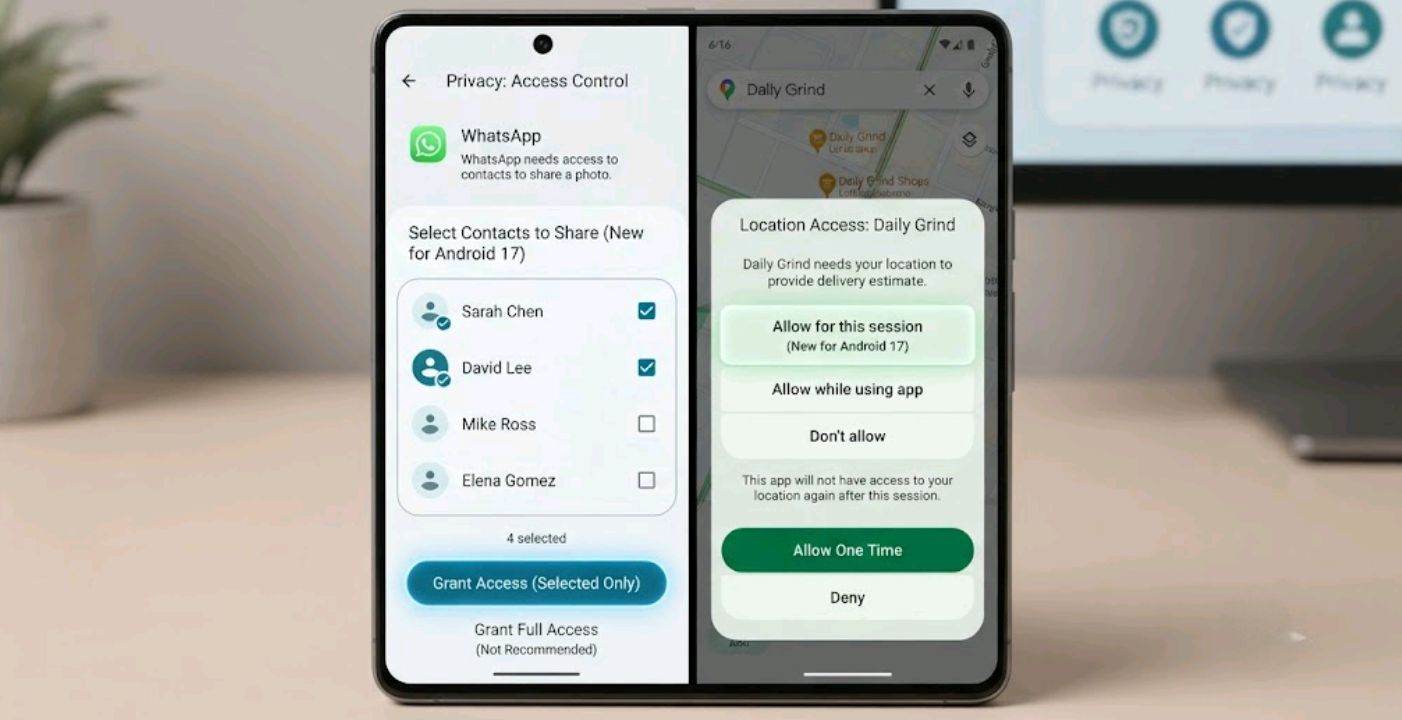
- Improved privacy — selective contact sharing, one-time location access
- Security upgrades — suspicious app behavior scanning, tighter PIN limits
- Rolling out to Pixel devices first, other brands through 2026
If you’re deciding whether to update, or wondering why your phone suddenly can’t do half the things a tech YouTuber is showing off, here’s the breakdown.
The design overhaul: Material 3 Expressive
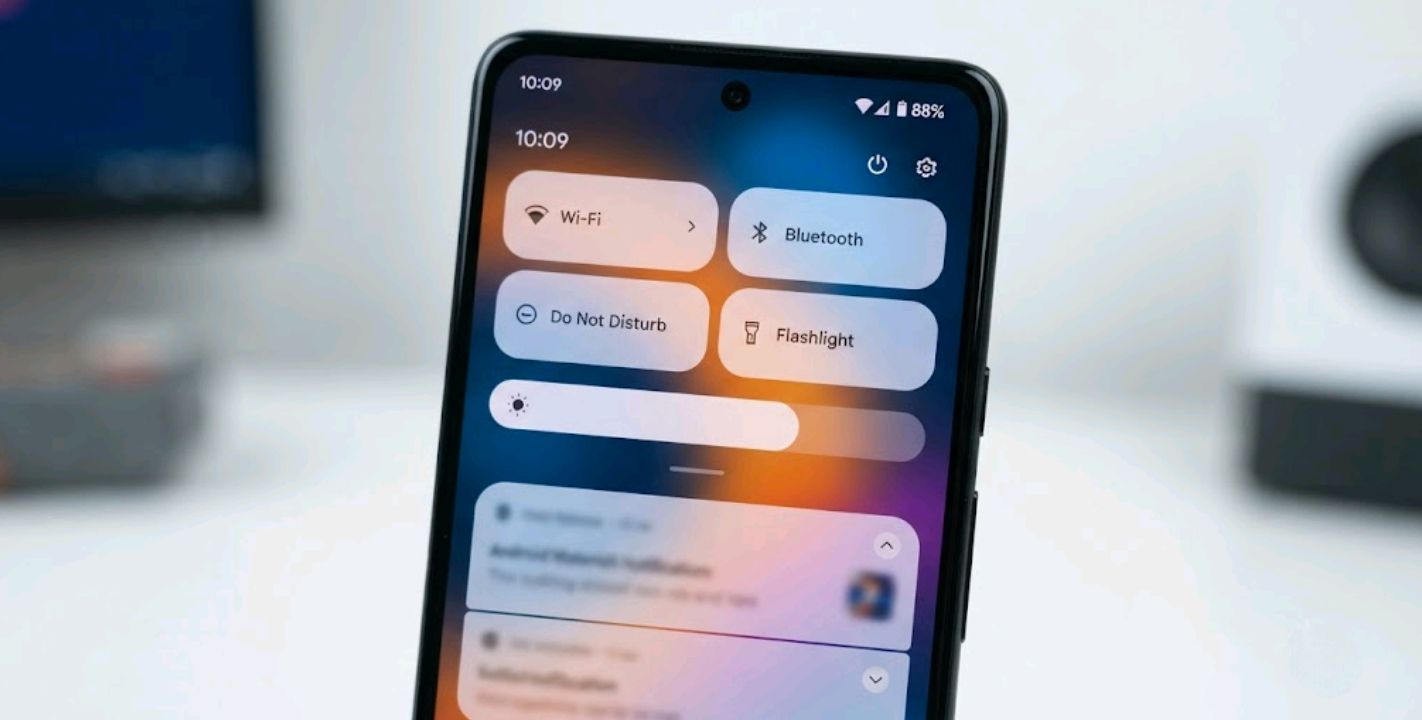
The most obvious change is visual. Android 17 brings a frosted-glass treatment across the system — volume sliders, the power menu, Quick Settings, notification shade, and widget picker all pick up a translucency effect that lets your wallpaper bleed through. Pixel owners already saw a version of this back in September 2025 through the Android 16 QPR1 update. Android 17 is expected to bring this design language to the broader ecosystem — Samsung, OnePlus, Xiaomi, and others — though it’s worth noting each manufacturer skins Android heavily (One UI, OxygenOS, HyperOS, and so on), so how closely their version matches Google’s frosted-glass look will depend on each brand’s own rollout, not just the underlying OS.
Comparisons to Apple’s “Liquid Glass” aesthetic surfaced online almost immediately, and Google’s Android ecosystem lead publicly pushed back on the idea. Reviewers at outlets like 9to5Google and How-To Geek who’ve used both say Android’s implementation reads as more restrained — less glassy shimmer, more subtle blur — though that’s a subjective comparison rather than a settled fact.
Gemini Intelligence: the feature most people won’t get
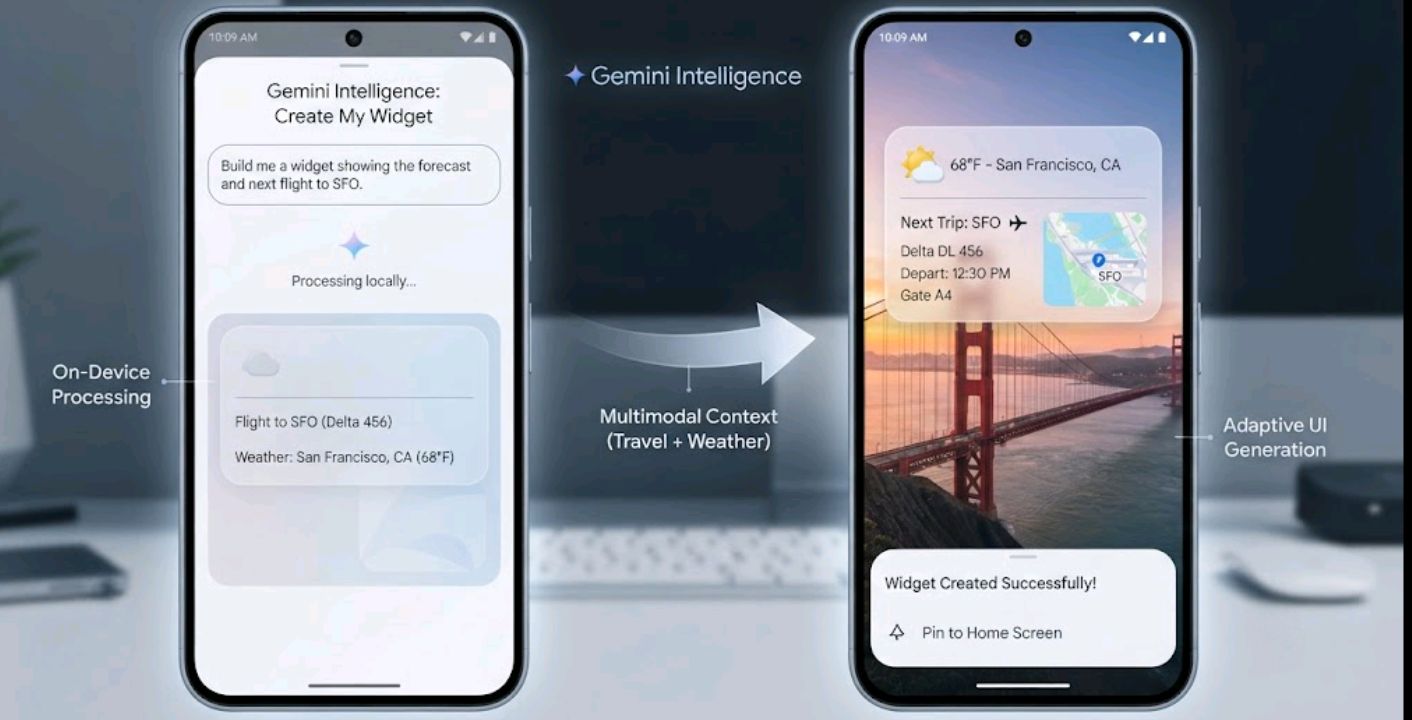
This is where Android 17 gets complicated. Official documentation describes Gemini Intelligence as a system-level AI layer — not a chatbot app, but a background process meant to chain tasks across apps: filling forms using context pulled from Gmail or Photos, building a home-screen widget from a plain-text description (“Create My Widget”), or cleaning up dictated speech in real time through a Gboard feature named Rambler.
The catch is hardware. According to Google’s own Gemini Intelligence requirements page, devices need a flagship-grade chipset, support for Gemini Nano v3, and at least 12GB of RAM — reportedly 50% more memory than the 8GB Apple requires for Apple Intelligence. Several outlets, including 9to5Google, report that this threshold excludes phones many people consider current flagships, such as the Pixel 9 Pro despite its 16GB of RAM — apparently because it lacks Nano v3 chip-level support rather than falling short on memory itself. Google has not publicly detailed why Nano v3 support is tied to specific silicon rather than being deliverable via a future update, so treat that specific explanation as reported rather than officially confirmed.
Devices reported to support Gemini Intelligence at launch
Based on Google’s stated requirements and device-tracking reports as of this writing. Final availability can vary by region and carrier, and Google has not published an exhaustive official device list.
| Brand | Qualifying models |
|---|---|
| Pixel 10, Pixel 10 Pro, Pixel 10 Pro XL (not the 10a) | |
| Samsung | Galaxy S26 series, Galaxy Z Fold 8, Galaxy Z Flip 8 |
| OnePlus | OnePlus 15 series |
| Xiaomi | Xiaomi 15 series, Xiaomi 17 series (select variants) |
| Oppo | Find X9, select Reno 14/15 Pro models |
If you’re weighing a purchase specifically to get these features, it’s worth reading through our best Samsung phones for 2026 guide or our broader best Android phones of 2026 roundup before spending on hardware that turns out to sit just below the cutoff.
Bubbles, foldable gaming mode, and everyday usability
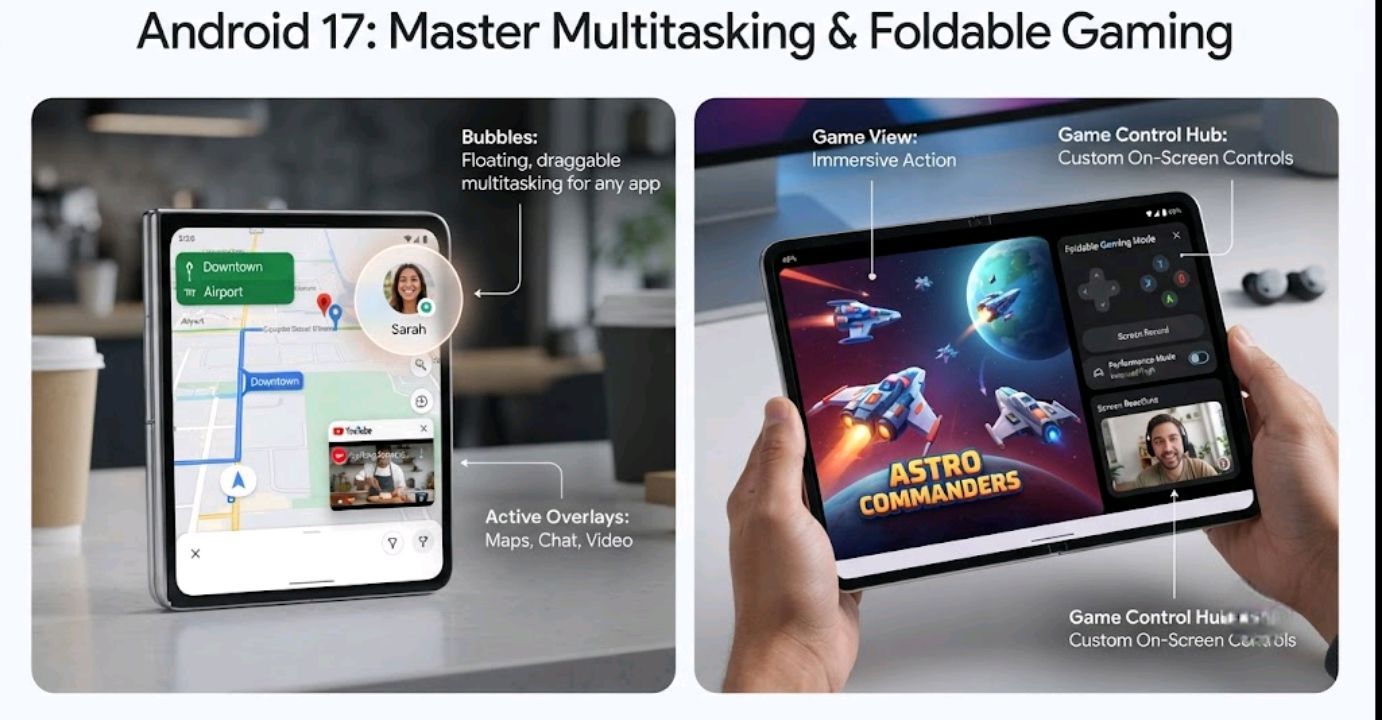
Away from the AI headlines, Android 17’s most-used feature might end up being Bubbles. Per the official rollout announcement, long-pressing almost any app icon collapses it into a floating window you can drag around the screen while doing something else — a multitasking pattern Android has flirted with before but is now shipping platform-wide.
Official release notes describe a dedicated foldable gaming mode that splits the display between game view and controls, and a feature called Screen Reactions that records your screen and front camera simultaneously with background removal, aimed at reaction videos and quick tutorials without a separate capture app. As with any newly announced feature, real-world performance can differ from the announcement — worth confirming once it’s live on your own device rather than assuming it works exactly as described.
Security and privacy get a real upgrade
This is the part that affects every Android 17 user, regardless of RAM. Per Google and beta-testing coverage from Android Authority, a new system-level Contacts Picker grants apps temporary, session-based access to only the specific contacts you choose, rather than blanket access to your full list. Location permissions reportedly get similar treatment: a one-time access button that lets an app use your precise location for a single session instead of holding standing access.
Android’s system update notes also describe scanning of installed apps for suspicious behavior patterns — such as SMS forwarding, hidden background launches, and misuse of accessibility permissions — paired with tighter PIN guess limits aimed at slowing brute-force attempts on a lost or stolen device.
Feature comparison at a glance
| Feature | Needs Gemini Nano v3 + 12GB RAM? | Available on all Android 17 devices |
|---|---|---|
| Material 3 Expressive (frosted glass) | No | Yes |
| Bubbles (floating app windows) | No | Yes |
| Selective Contact Sharing | No | Yes |
| One-time location access | No | Yes |
| Foldable gaming mode | No | Foldables only |
| Gemini Intelligence (agentic AI) | Yes | No — flagship-only |
| Create My Widget (AI widgets) | Yes | No — flagship-only |
| Rambler voice cleanup | Yes | No — flagship-only |
What this means if you’re buying a phone right now
For most people reading this from Nigeria, the honest advice is: don’t buy a phone purely to chase Gemini Intelligence unless you’re already shopping in flagship territory. The security and interface improvements land on every eligible device — including older Pixels and mid-rangers once OEMs push their skinned updates later in the year — so a budget or mid-tier phone still benefits meaningfully from Android 17. If camera performance matters more to you than AI extras, our best camera phones 2026 guide is a better starting point, and if you’re torn between ecosystems entirely, it’s worth checking our iPhone buying guide for 2026 or the OnePlus lineup breakdown before committing.
FAQ
When did Android 17 launch? Android 17 went stable on Pixel devices on June 16, 2026. Samsung, OnePlus, Xiaomi, and other brands are rolling their versions out through the rest of 2026.
Does my phone need 12GB of RAM to install Android 17? No. That requirement is specific to Gemini Intelligence, not the OS itself. Android 17’s design changes, Bubbles, and privacy features work on any eligible device, regardless of RAM.
Is Gemini Intelligence the same as the Gemini app? No. The Gemini app is a cloud-based assistant that works on most phones running Android 10 or later. Gemini Intelligence is a separate, system-level AI layer that runs locally and needs Gemini Nano v3 hardware — a much stricter requirement.
Will the Pixel 9 ever get Gemini Intelligence? As of this update, no — not because of RAM, but because the Pixel 9 series lacks Nano v3 chip-level support. Google hasn’t confirmed whether this changes with a future update.
When will Samsung phones get Android 17? Samsung’s One UI build based on Android 17 is expected to follow the Pixel rollout later in 2026, though Samsung hasn’t published a firm date. Some reports point to the Galaxy Z Fold 8 as an early device for Gemini Intelligence specifically, but that hasn’t been officially confirmed by Samsung as of this writing.
Is Android 17 worth updating to if I don’t have a flagship phone? Yes. The privacy overhaul — selective contact sharing, one-time location access, and app behavior scanning — applies regardless of hardware tier, and that alone is a meaningful upgrade over Android 16.
Sources
- Google — Android 17 features announcement
- 9to5Google — Gemini Intelligence Android spec requirements
- Android Authority — Android 17: official and leaked features
- TechRadar — Gemini Intelligence hardware requirements revealed
- How-To Geek — Gemini Intelligence device requirements
- Android Central — Android 17 announcements from The Android Show 2026
- TechCabal — Every Android 17 feature coming to your phone in 2026

Comments 0
Leave a comment