Table of Contents
Overview
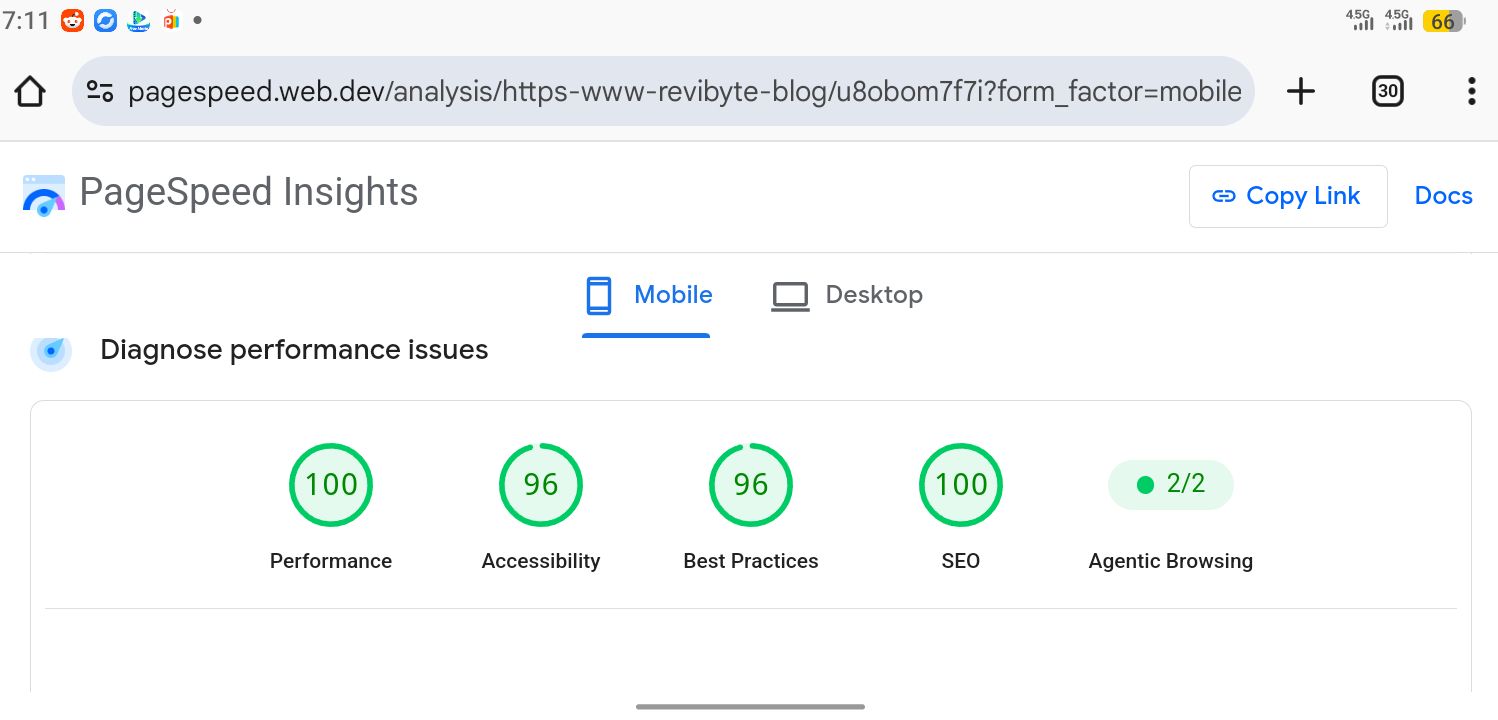
On the day I tested, ReviByte scored 100 for Performance in PageSpeed Insights, along with 100 for SEO and 96 for both Accessibility and Best Practices. Scores like this can shift depending on the tested URL, network conditions, and the Lighthouse version running the test, so I’m not claiming this is locked in forever. What I can talk about with more confidence is everything that used to be broken, and the specific changes that fixed it.
None of this happened in a local dev environment. Every fix below was made directly in GitHub’s web editor, on a phone, without a local build to preview changes before pushing them.
The layout shift nobody could see coming
For a long stretch, ReviByte’s Cumulative Layout Shift numbers were inconsistent. The cause was a checkPWA() function injecting padding-top and padding-bottom onto the <body> tag after the page had already painted, to make room for a PWA-style top bar and bottom navigation. Lighthouse penalizes exactly this kind of post-paint layout change hard. The fix was removing the entire PWA navigation system and letting the standard <Header /> component render consistently on every load.
Ads were shifting the layout too
AdSense was contributing to the same problem. Ad slots loading without reserved space push everything below them down the moment the ad renders. The fix was reserving fixed space for every ad container ahead of time and turning off some Auto ads features that were injecting ads unpredictably. Between that and the PWA fix, layout shift dropped to effectively zero.
Images that don’t guess their own size
A custom rehype plugin, rehype-optimize-images.ts, adds explicit width and height attributes to every Markdown image at build time. Without those dimensions, the browser reflows the page once each image loads. Combined with Vercel’s image optimization endpoint for on-demand resizing, images stopped being a layout liability. For more on this, see Astro Performance Tips That Actually Move the Needle, which covers the same image and hydration principles in more depth.
A canonical URL inconsistency
getPath.ts had been stripping trailing slashes instead of enforcing them, working against the trailingSlash: true setting in vercel.json. That likely contributed to inconsistent canonical signals that could affect indexing, though I don’t have Search Console data isolating its exact impact.
| Metric | Before | After |
|---|---|---|
| Performance | 78 | 100 |
| CLS | 0.18 | 0.00 |
| LCP | 2.9 s | 1.4 s |
| Fix | Problem it solved |
|---|---|
| Removed PWA topbar/bottom-nav system | Post-paint layout shift from injected padding |
| Reserved ad space + disabled some Auto ads | Layout shift from AdSense units loading unreserved |
rehype-optimize-images.ts | Missing image dimensions causing reflow |
getPath.ts trailing slash fix | Inconsistent canonical URL signals |
Getting to 100 wasn’t about finding one magic optimization. It was the accumulation of dozens of small fixes — removing unnecessary JavaScript, stabilizing layout, cleaning up canonical URLs, reserving space for ads instead of letting them push content around, and paying attention to what Lighthouse was actually reporting instead of assuming the score would fix itself. Building everything from a phone made the process slower, but it also proved that performance work is more about understanding your code than having expensive tools.
FAQ
Do I need a local dev environment to fix performance issues like this? No. Every fix described here was made directly through GitHub’s web editor on a mobile device, with no local build step required to identify or resolve them.
Is a 100 Performance score mostly an Astro default, or does it require real work? Both. Astro’s low-JavaScript-by-default approach gives a strong starting point, but layout shift bugs — from PWA navigation systems to unreserved ad slots — can tank the score regardless of framework.
Do AdSense ads always cause layout shift? Not if space is reserved for them ahead of time. The shift usually comes from ad containers with no fixed height, or from Auto ads features injecting units into unpredictable spots on the page.
Why group the canonical URL fix with performance fixes? Because it came from the same root cause as the others: code that worked most of the time but broke silently under specific conditions — whether that was a canonical URL mismatch or a post-paint layout shift.


Comments 0
Leave a comment