Table of Contents
Open Table of Contents
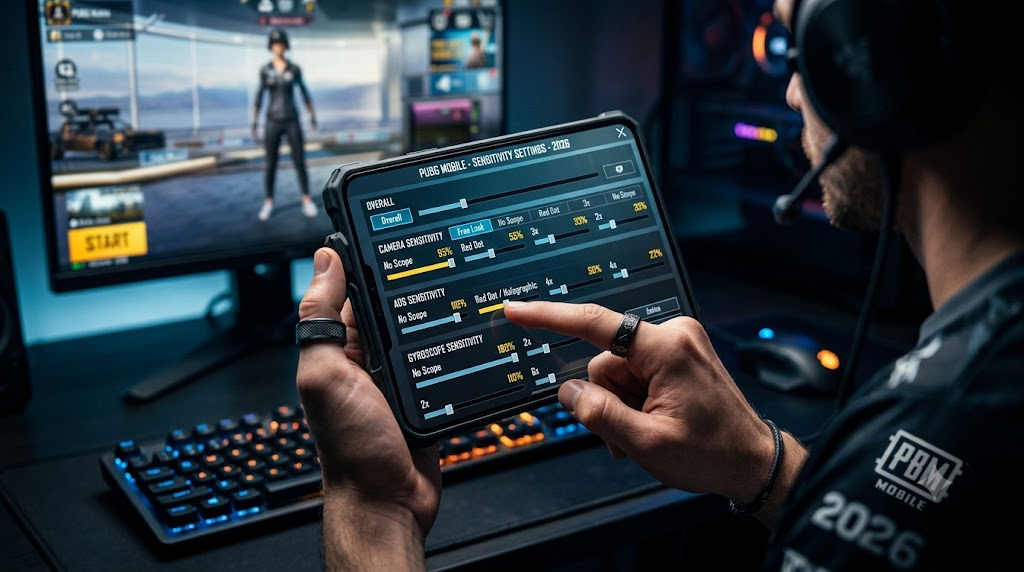
- Best Sensitivity Settings for PUBG Mobile 2026
- Why Sensitivity Settings Actually Matter
- Camera Sensitivity Settings
- ADS (Aim Down Sight) Sensitivity
- Gyroscope Sensitivity Settings
- Control & Assist Settings
- Device-Specific Adjustments
- How to Practice and Lock In Your Settings
- Quick-Reference Cheat Sheet
- FAQ
Best Sensitivity Settings for PUBG Mobile 2026
While plenty of players chase pro settings the moment a new season drops, sensitivity is one of those things that’s deeply personal — it shifts based on your device, your grip, how much screen real estate your thumbs cover, and whether you play two hours a week or two hours a day. Copying numbers is a starting point, not a solution.
Based on common competitive setups, community testing, and practical gameplay experience, these recommendations provide a strong starting point for most players — in final circles, during third-party chaos, and in those 1v1 duels where consistency under pressure separates a win from a top-10 finish.
Why Sensitivity Settings Actually Matter
Most players treat sensitivity as something you set once and forget. The problem? PUBG Mobile demands three very different control scenarios — long-range tapping, mid-range burst control, and close-range spray. A single sensitivity slider cannot serve all three equally well.
Getting your sensitivity dialed in means:
- You stop over-correcting in mid-range fights
- Your 6x and 8x shots stop drifting off target after the first bullet
- Close-range CQC doesn’t feel like you’re wrestling the camera
The goal isn’t to copy a pro player’s exact numbers. Their device, grip style, and thumb placement are different from yours. The goal is to understand the logic behind the numbers, then land somewhere that feels locked in for you.
Camera Sensitivity Settings
Camera sensitivity controls how fast your screen moves when you swipe — both in free look and while aiming down sights. These are the foundational numbers everything else builds on.
| Scope / Mode | Recommended Range | Sweet Spot |
|---|---|---|
| Free Look | 80–110% | 95% |
| Camera (No Scope) | 85–120% | 100% |
| Red Dot / Holographic | 45–65% | 55% |
| 2x Scope | 35–50% | 42% |
| 3x Scope | 28–40% | 33% |
| 4x Scope / ACOG | 20–32% | 26% |
| 6x Scope | 10–18% | 13% |
| 8x Scope | 6–12% | 9% |
Why these drop off with zoom: At higher magnification, even a 1mm thumb movement translates to several degrees of screen rotation. Low sensitivity at 6x and 8x gives you the fine motor control you need to hold headshots at 400m.
ADS (Aim Down Sight) Sensitivity
ADS sensitivity controls how fast your aim moves while you’re shooting. This is where most players make the mistake of copying camera sensitivity directly — don’t. Your ADS numbers should sit slightly lower than your camera numbers to give you stability during recoil.
| Scope / Mode | Recommended Range | Sweet Spot |
|---|---|---|
| No Scope ADS | 80–110% | 90% |
| Red Dot / Holo ADS | 45–60% | 50% |
| 2x ADS | 33–48% | 38% |
| 3x ADS | 25–38% | 30% |
| 4x / ACOG ADS | 18–28% | 22% |
| 6x ADS | 8–15% | 11% |
| 8x ADS | 5–10% | 7% |
For aggressive players who push constantly, bumping your no-scope and red dot ADS up by 5–8 points makes snap-turning in tight buildings feel much smoother. For passive or sniper-focused players, drop everything down another 3–5 points.
Gyroscope Sensitivity Settings
Gyroscope is either your best friend or the reason you’re dropping your phone mid-fight. If you’re not using gyro, skip this section — forcing yourself to adopt it mid-ranked grind is a fast way to drop rating.
If you do use gyro, here’s a baseline that doesn’t feel twitchy:
| Scope | Recommended Range | Sweet Spot |
|---|---|---|
| No Scope Gyro | 150–220% | 180% |
| Red Dot Gyro | 120–170% | 140% |
| 2x Gyro | 90–130% | 110% |
| 3x Gyro | 65–95% | 78% |
| 4x Gyro | 50–75% | 60% |
| 6x Gyro | 25–45% | 32% |
| 8x Gyro | 15–28% | 20% |
Gyro works best for players who tilt the phone naturally when tracking enemies. If you find yourself fighting against the gyro rather than with it, lower everything by 20% and give it two full sessions before giving up.
Control & Assist Settings
Sensitivity numbers alone don’t tell the whole story. These in-game toggles interact directly with how your aim feels — and getting them wrong can undercut even a well-tuned sensitivity setup.
| Setting | Recommended | Notes |
|---|---|---|
| Aim Assist | On (TPP) / Test both (FPP) | See note below |
| Peek & Fire | On | Essential for corner play without full exposure |
| Lean Mode | Hold | Gives you more deliberate control over leaning |
| Gyroscope | Always On / Scope On | Depends on your play style |
| Camera Rotation While ADS | Off | Prevents accidental camera drift mid-spray |
On Aim Assist in FPP: Some competitive players prefer turning Aim Assist off in FPP for more consistent manual tracking, while others leave it enabled and perform just as well. There’s no universally correct answer — test both over several sessions and stick with whatever produces cleaner results for you personally.
Device-Specific Adjustments
Your phone matters here. Higher frame rates make aiming feel smoother and more responsive overall — which leads many players on flagship devices to naturally prefer slightly lower sensitivity values once they move to 90fps or 120fps mode. It’s not that the sensitivity changes mathematically, it’s that the increased responsiveness makes higher values feel harder to control precisely.
| Device Tier | Frame Rate Mode | Sensitivity Adjustment |
|---|---|---|
| Flagship (Snapdragon 8 Gen series, A-series) | 90fps / 120fps | Drop all values by 5–8% |
| Upper Mid-Range | 60fps smooth | Use base values as listed |
| Lower Mid-Range | 60fps balanced | Bump camera sensitivity +5% |
| Budget Device | 30–40fps | Use higher sensitivity across the board |
If you recently upgraded your phone and everything feels “too fast,” this is exactly why. Drop your sensitivity slightly and re-train for a week.
How to Practice and Lock In Your Settings
The biggest mistake players make is changing sensitivity every three games. That’s not testing — that’s panic. Here’s an actual process:
- Set your values using the tables above as a starting point
- Go into Training Mode and spend 10–15 minutes hitting still and moving targets at every range
- Play 5 full matches without changing anything — you need real game context, not training room feelings
- Identify one specific problem (e.g., 6x shots drift left) and adjust only that scope’s sensitivity by 2–3 points
- Repeat until you stop thinking about your sensitivity mid-fight
Most players reach a locked-in feeling within 2–3 weeks of disciplined tuning. After that, the settings become muscle memory and you stop noticing them entirely — which is exactly the goal.
Quick-Reference Cheat Sheet
Here’s a single-table summary you can screenshot and reference during setup:
| Setting | Value |
|---|---|
| Free Look | 95% |
| No Scope Camera | 100% |
| Red Dot Camera | 55% |
| 2x Camera | 42% |
| 3x Camera | 33% |
| 4x Camera | 26% |
| 6x Camera | 13% |
| 8x Camera | 9% |
| No Scope ADS | 90% |
| Red Dot ADS | 50% |
| 2x ADS | 38% |
| 3x ADS | 30% |
| 4x ADS | 22% |
| 6x ADS | 11% |
| 8x ADS | 7% |
FAQ
Q: Should I turn off Aim Assist in FPP ranked?
Some competitive players prefer turning Aim Assist off in FPP for more consistent manual tracking, while others leave it enabled and perform just as well. It’s worth knowing that in official PUBG Mobile esports tournaments like PMGC, Aim Assist is disabled by the room settings anyway — so players who practice in ranked without it are already prepared for that environment. For regular ranked play, test both and stick with whichever feels more natural after a full session.
Q: My shots are consistent in training but all over the place in real matches. Why?
Adrenaline. When you’re in a real fight, micro-tremors in your hands increase. This is why some players deliberately tune their sensitivity slightly lower than what “feels good” in training — it absorbs that real-match shakiness.
Q: What’s the best sensitivity for spray control on the AKM or Beryl M762?
High-recoil guns like the AKM and M762 benefit from lower ADS sensitivity on red dot and 2x — try dropping those 5 points below the table values. The gun’s natural kick becomes easier to manually compensate when your sensitivity isn’t amplifying every micro-movement.
Q: I changed my settings and everything feels wrong. How long should I stick it out?
At minimum, 5 full Classic matches. Ideally, an entire session of 8–10 games. The discomfort in the first few games is mostly your muscle memory protesting, not a sign the settings are wrong. If it still feels off after 10 games, then make one small adjustment.
Q: Does phone temperature affect sensitivity?
Indirectly, yes. When your phone throttles due to heat, frame rate drops — and at lower FPS, the same sensitivity values can feel slightly faster or jerkier. If you play long sessions, keeping your phone cool (case off, room temperature environment) keeps your performance consistent.
Q: Is gyroscope cheating or frowned upon in competitive play?
No — gyroscope is a fully supported in-game feature and widely used at every level of competitive PUBG Mobile. The advantage it provides in recoil control is offset by the learning curve and the physical awkwardness it introduces in some situations.
Q: Why do pro players use such low sensitivity?
Many competitive players prefer relatively low sensitivity on 4x and higher scopes because it offers more precise long-range aiming — small, deliberate movements translate to exact target tracking. For newer players, slightly higher values are more forgiving while you’re still building that muscle memory.
Sensitivity is the kind of thing that rewards patience. The players who keep tweaking every session never build real muscle memory — they’re always adapting to something slightly different. Find your numbers, commit to them, and let the practice do the work.
Note on season: This guide was written during C9S29. PUBG Mobile seasons rotate roughly every two months — the sensitivity mechanics and in-game settings covered here don’t change between seasons, but always verify the current season name on your ranked rewards screen before publishing or sharing.

Comments 0
Leave a comment